Stop writing tickets: record the bugs, mark each one, hand over the video
Most guides to writing tickets teach you to type more carefully. We tried talking instead: one recording of 2 minutes 11 seconds, six pen marks, five problems, one GitHub issue.
By Darek Markiewicz · · 14 min read
Writing tickets well means supplying five things: a specific title, the steps to reproduce, what you expected and what happened, the environment, and a screenshot. Then the bug reporting guides add a rule, one problem per ticket, and that rule is where the afternoon goes. You can skip the typing. Record your screen once, say each problem out loud, and mark it with a pen as you go. Three tools turn that recording into work a coding agent can pick up. Vidmatic keeps every pen mark as its own image with its time and files one GitHub issue that lists each ask. Jam adds console and network logs and lets an agent draft one ticket per problem. Loom's Record for agent turns a recording of up to five minutes into a task list for an agent, or into Jira work items.
Writing to a help desk? Use the second template below. The rest of this post is about bugs and changes in software you can see on a screen.
How to write a good ticket: what the guides tell you to include
We read the pages that rank for how to write a good ticket. They mostly agree on five things.
- A specific title. Atlassian's community guide calls it "the most important part of a Jira ticket" (guide). O-RAN's guide gives the pattern: "X is doing Y instead of Z" (guide).
- Steps to reproduce. "A bulleted list, starting from the initial state to the point where the problem occurred" (Acro Commerce).
- Expected and actual. "What did you expect to happen? What actually happened?" (Gleap).
- The environment. "Provide info on OS, Browser, Java version" (O-RAN).
- Something to look at. "Attach logs or screenshots" (O-RAN). Acro Commerce goes further and calls screenshots or screencasts "the most effective way to communicate with your development team".
Some add two more: "Describe the problem - not the solution" (Good ticket guide), and acceptance criteria, which Atlassian's guide frames as "What needs to be complete to move this ticket to a DONE status".
Bug ticket template
Title, steps, expected, actual, environment, attachment and acceptance criteria. This one is filled in with the first problem from the example further down:
Title: Inbox has no way to dismiss an item for good
Steps to reproduce:
1. Open the Inbox with a lot of agent-made items in it
2. Look for a way to remove one so it does not come back
Expected: a Dismiss button
Actual: there is none, and removed items keep coming back
Environment: Chrome, production
Attachment: screenshot of the top bar, where the button should go
Acceptance criteria: a dismissed item stays gone after a reload
Help desk ticket template
For a help desk or IT support ticket, four lines are enough:
Subject: what is broken, in one line
What I was trying to do:
What happened, with the exact error text:
Account, order or device:
Acro Commerce gives the test for the first kind: "If another person can follow your ticket and recreate the bug quickly, you have a well-written ticket." Every line of that bug ticket describes something you were looking at. You typed out what a recording would have shown.
One bug per ticket: the rule that makes writing tickets slow
Then comes the rule the bug reporting guides agree on.
- The Linux kernel docs: "If you deal with multiple issues at once, you'll have to report each of them separately, as they might be handled by different developers" (Reporting issues).
- Loom's bug report guide says it about video too: "Record one bug per video whenever possible" (guide, read 2026-11-09). Gleap's version is "If you find three issues, create three reports."
A ticket with three problems is hard to assign and hard to close, so the rule is sound. The reporter pays for it. You open a page and see five things wrong, and under the rule that is five titles, five sets of steps, five expected and actual pairs, five screenshots. The temptation is to report the worst problem and let the other four go.
One developer, Alexander Korovin, put the cost of a single ticket at an hour: reproduce the bug "and then spend the next hour turning it into a ticket" (the post). The fix in that post was to record the screen while complaining out loud and let a local tool draft the issue. Loom's own Record for agent, in open beta, now splits one video into tasks.
Five problems in one recording: a real example
In late October 2026, one of us opened a page of the Vidmatic app, started a recording from the Chrome extension, and talked. "Number one": the page needs a Dismiss button, and a circle on the spot where it should go. "Number two", and on down the page. None of the five was a crash. They were the small visible things that rarely get filed. The recording runs 2 minutes 11 seconds and holds 231 spoken words and six pen marks. No ticket was typed.
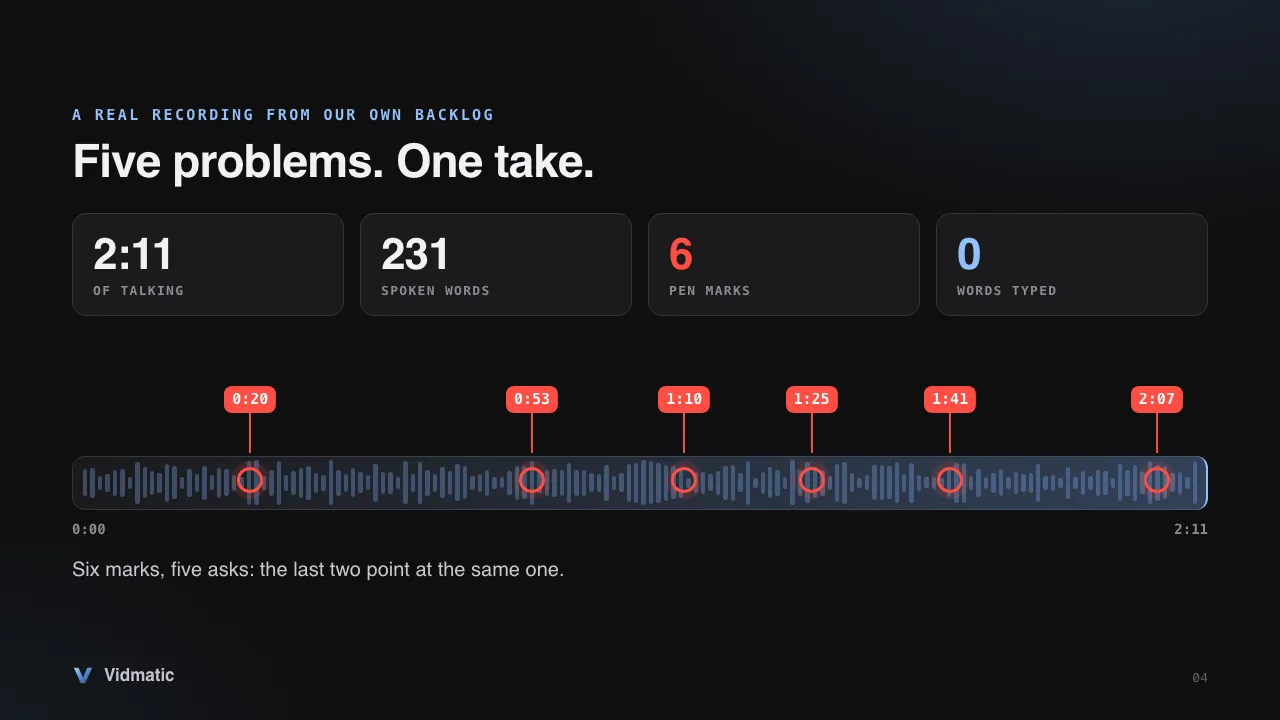
This is what Vidmatic kept for each mark. The time is the moment the mark was confirmed, and the sentence is the one being spoken then:
| Mark | Confirmed at | What was being said |
|---|---|---|
| A circle on an empty spot in the top bar | 0:20 | "that is going to remove it for good because it keeps coming back." |
| A circle around the Share button, the style to copy | 0:53 | "with the rest of the user interface." |
| An arrow and a box beside the issue link | 1:10 | "That work stream should also show up here as a link so I can go there." |
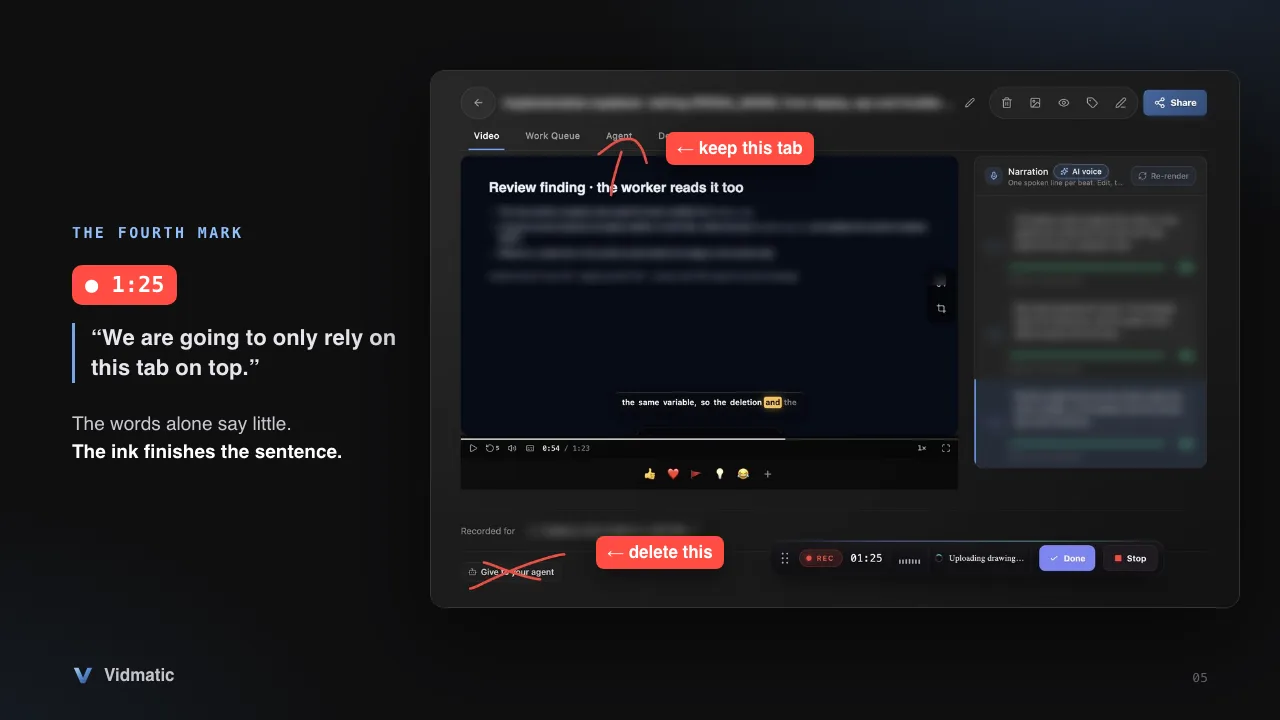
| A cross through a button, an arrow to a tab | 1:25 | "We are going to only rely on this tab on top." |
| A loop around a whole panel on that tab | 1:41 | "So for a completed work, all of this information should really be replaced with whatever the" |
| A circle around a finished card, with an arrow | 2:07 | "like to see with the demo in there and such." |
Each row is also a picture: the screen as it looked at that second, with the red ink on it.
The first mark circles nothing. The Dismiss button does not exist yet, so there is no element to click, and a screenshot would show an empty bar. A typed ticket has to describe the spot in words. The circle just says where the button should go.
The fourth mark does the opposite job. The sentence saved with it is complete and still useless on its own: "We are going to only rely on this tab on top." Which tab? The picture answers with a cross through one button and an arrow pointing at one tab.
An agent read the recording with our repo open and filed one GitHub issue. Here is the fourth ask as it appears in that issue:
4. Remove the bottom "Give to your agent" block. "we don't need this because that's already here ... remove the go give to your agent at the bottom. We are going to only rely on this tab on top."
Under "Current behavior" the issue says where that block lives: web/src/app/(authenticated)/recordings/[id]/page.tsx, around line 1107. Under "What to build" it says to remove that section, because "the top tab is the single entry point." That came from about fifteen seconds of talking and one cross.
The issue lists five asks in all, each quoting the recording, then edge cases and how to verify the result. The last two marks, the loop at 1:41 and the circle at 2:07, serve the same ask, which is why six marks made five. The issue was filed on October 24 at 19:51 UTC, and the pull request that closed it merged at 03:18 UTC, about seven and a half hours later.
That is one example from one team, with our own tool, so treat the seven and a half hours as an anecdote. The part that carries over is the input: 2 minutes 11 seconds of talking stood in for what the rule would have made five tickets.
Multiple bugs in one ticket, or one recording: what each tool does
Checked 2026-11-09, from each vendor's own pages.
| Loom (Record for agent) | Jam | Vidmatic | |
|---|---|---|---|
| Several problems in one recording | Yes: turns the video into "discrete, executable tasks" (docs) | Yes: an agent drafts "one ticket per problem, each linking the same Jam at its own timestamp" (docs) | With a coding agent: one GitHub issue that lists each ask (docs). The Create GitHub issue switch alone: a link, a transcript or both |
| Drawing while you record | Magic pen, "temporary freehand annotations", plus a Selection tool that pins the element you click; both are in the desktop app steps | Draw tool; shapes "fade away automatically after 3 seconds" (docs) | Pen in the Chrome extension: circle, cross out or write by hand (docs) |
| Each mark kept as its own image with its time | Partly: keyframes are snapshots that include the pen drawings, and each task carries a timestamp. One image per mark is not listed | Not listed. The agent can ask for frames at any timestamp (MCP docs) | Yes, with the sentence you were saying (docs) |
| Console and network logs | Yes, in the Chrome extension | Yes, on every video recording | No |
| Longest recording | Five minutes in this mode | Free: 5 minutes. Team and Enterprise: 30 minutes in the browser extension (docs; the Team pricing card says 15), 60 in Jam for Mac (pricing) | 60 minutes in the extension, on every plan |
| Where the ticket lands | Jira, with an Atlassian account and a Jira subscription; or open the prompt in another agent, or copy it. Outside this mode, Loom's AI workflows send a bug report to Jira or Linear (docs) | Jira, Linear, GitHub and GitLab among others (integrations) | GitHub only |
| Asks tied to files in your code | Not listed for the prompt | Not listed for the ticket. Handed to "a coding agent with your code open", Jam's skills return "a numbered list of the asks, then the changes" (docs) | With a coding agent: the skill asks it for 1 to 3 file and line anchors per ask |
| Price to start | Record for agent is in open beta on Business + AI ($24 per user a month as listed; the page advertises up to 17% off billed annually) and Enterprise (pricing) | Free: 30 Jams a month. Team: $14 per creator a month, billed yearly (pricing) | Free: 25 recordings; more are kept but locked. Pro: $25 per seat a month, or $20 billed annually (pricing) |
"Not listed" means the vendor's pages do not say.
Which one should you pick to stop writing tickets
- The bug is a failed request or a console error. The page looks fine and the cause is underneath. Use Jam (our Jam comparison has the detail). Console logs and "fully inspectable network requests" come with every video recording, and its Instant Replay can capture a bug that already happened.
- Your team lives in Jira. Use Loom's Record for agent. It files Jira work items, and in the desktop app its Selection tool pins the exact element you click.
- Your tickets go to several trackers. Use Jam.
- You can see what is wrong, there is a lot of it, and the work goes to a coding agent in a GitHub repo. Use Vidmatic. That covers a design review, or a list of ten small things nobody would file one by one.
- One problem, one sentence. Type it. A recording is not faster than "fix the typo in the footer".
Where Vidmatic wins
The mark stays
When you confirm a mark, the screen with your ink on it is saved as an image with its time. Neither Loom nor Jam documents a saved image per mark; Loom's keyframes do include the drawings. Your agent gets the image through get_annotation_image, and our docs tell it what to do when ink and words disagree: "your agent should trust the mark" (what your agent receives). You can check the marks yourself. The recording's page shows them as thumbnails with their times in a Drawings tab.
The issue points into your code
The skill that turns a recording into an issue tells the agent, for every ask, to quote it with its timestamp, name the mark, and find one to three places in your code. If it finds none it must write "anchor: none found" instead of guessing. In the example above that is the line naming page.tsx.
An hour of room, without paying
Sixty minutes on the Free plan, against five on Jam's Free plan and five in Loom's Record for agent, which is a paid mode. Paid Jam matches the hour in its Mac app. The room matters when you walk a whole screen with a designer beside you.
Where it does not
- No console or network logs. Vidmatic sees what you see and hears what you say. Jam and Loom capture what the browser knows.
- One issue, not five. However many asks a recording holds, Vidmatic files one issue that lists them (recording to issue). If you want five tickets for five assignees, Jam's one ticket per problem is the better shape.
- GitHub only. It is the only tracker a recording files into today. No Jira, no Linear.
- The pen needs Chrome. Without the extension, New Recording in the web app records any screen or window, but there is no pen: you say which element you mean and pause on it.
- No desktop app, and nothing that rewinds. Loom's Record for agent also runs in its desktop app, and Jam has apps for Mac and iOS. If the bug has already happened and will not happen again, Jam's Instant Replay has it and we do not.
- Two documented agents. Claude Code and the Cursor desktop app (MCP docs). Jam's MCP page names more clients, ChatGPT among them.
How to stop writing tickets today
Set up once: create a Vidmatic account, install Vidmatic from the Chrome Web Store and sign in to it. Then pick one of two tracks. The first gives you the issue this post showed, with every ask and where it lands in your code. The second needs no agent and gives you less.
With a coding agent
- Connect Vidmatic to Claude Code or the Cursor desktop app, once (quickstart). Open the agent in the repository the page belongs to. If GitHub is connected in Vidmatic and its default repository is this one, Vidmatic files the issue through its GitHub App. Otherwise the agent files it with the GitHub access it already has on your machine, so check that it can open issues there.
- Open the page that bothers you, click the Vidmatic icon in Chrome's toolbar and press Start recording. Allow the microphone if Chrome asks. A recorder bar appears on the page with a clock, a pen button and Stop.
- Talk. Number the problems out loud if that helps you; without your voice a mark has no sentence. When you reach a problem, press the pen and circle it, cross it out, or write the right value by hand. While you draw, the pen button reads Done. Press it to confirm the mark. That is the moment its picture is saved; the ink then clears from the page.
- Press Stop. Once the recording has uploaded, a Recording ready card offers Handoff to agent. Leave it on Copy agent prompt, press it, and paste into your agent. The prompt starts with
/mcp__vidmatic__workstream_from_videoand the recording's id. (That is the wording in extension version 1.0.3, on the Chrome Web Store when we checked on 2026-11-09. In the web app the same hand-off is called Give to your agent.) The agent waits for the transcript if the recording is new, reads it and every mark, finds where each ask lands in your code, files one GitHub issue, and then starts the work.
Without one
- In Vidmatic go to Settings, then GitHub, press Connect GitHub and choose a default repository (GitHub docs). You need permission to install a GitHub App on that repository.
- In the extension's popup, turn on Create GitHub issue before you press Start recording, then record and mark as above.
- Press Stop. Vidmatic opens the issue in your default repository with a link to the recording, the full transcription, or both. It does not list the asks one by one or point into your code; that part is the agent's. Plan limits are on the pricing page.
If the ticket is for a teammate to pick up, create a ticket from a video covers that side. For a loop that keeps taking recordings while you do something else, a website change request for your coding agent walks through it. For how the marks, the transcript and the issue fit together, read screen recording for AI agents.
Next time a page has five things wrong, time yourself. 2 minutes 11 seconds is the number to beat.
Frequently asked questions
- How do you write a good ticket?
- Give it a specific title, the steps to reproduce, what you expected and what happened, the environment, and a screenshot or recording. Bug reporting guides such as O-RAN's, the Linux kernel's and Gleap's add a rule: one problem per ticket.
- Should I report multiple bugs in one ticket?
- In a typed ticket, no. The Linux kernel docs, O-RAN's Jira guide and Gleap's bug reporting guide all say to split them; Gleap's reason is that bundled reports are harder to assign and harder to close. In a recording you can: Vidmatic files one GitHub issue that lists every ask, and Jam documents an agent that drafts one ticket per problem from a single recording.
- What is the one bug per ticket rule?
- The advice to file each problem as its own ticket. O-RAN's Jira guide states it as "One bug per Jira ticket", and the Linux kernel docs say to report each issue separately because different developers may handle them. It keeps tickets easy to assign and close, and it multiplies the reporter's typing.
- Does Vidmatic capture console logs or network requests?
- No. Vidmatic records the screen, your voice and your pen marks. Jam attaches console logs and network requests to every video recording, and Loom's Record for agent captures them in its Chrome extension. If the bug lives in a failed request, use one of those.
- Can a screen recording replace a written ticket?
- For problems you can see, yes, if the tool turns the recording into something a tracker can hold. Vidmatic files one GitHub issue from the recording, and GitHub is the only tracker it files into today. Jam and Loom's Record for agent reach Jira, and Jam reaches Linear and others. For a one line fix, typing is still faster.
- Do I need a coding agent to stop writing tickets?
- No. With GitHub connected, the Create GitHub issue switch in the extension's popup opens an issue when you stop, with a link to the recording, the full transcription, or both. A coding agent adds the part a transcript cannot: it reads your pen marks and ties each ask to files in your repo.
- How do you write a help desk or IT support ticket?
- Four lines are enough: a subject that says what is broken, what you were trying to do, what happened with the exact error text, and the account, order or device it happened on. Add a screenshot when the problem is visible.
- How long can one screen recording of bugs be?
- The Vidmatic Chrome extension stops a recording at 60 minutes, on the Free plan too. Loom's Record for agent is limited to five minutes. Jam gives 5 minutes on its Free plan; on paid plans its docs give 30 minutes in the browser and its pricing table gives 60 in Jam for Mac.
Full video transcript
You open a page and see five things wrong. Every guide to writing tickets says the same thing: a title, the steps, expected, actual, the environment, a screenshot. Then comes the rule. One bug per ticket. The Linux kernel docs say it. Loom's own guide says it about video. Five problems, five tickets. Or you could just say it. Once. Start a recording from the Vidmatic Chrome extension, and talk. This is a real recording from our own backlog. Two minutes eleven. Two hundred thirty one words, six pen marks, nothing typed. Here is the mark at one twenty five. The sentence alone is a fragment. Which tab? The ink answers: delete this button, keep that tab. Vidmatic keeps every mark as a picture of the screen, with its time, and the sentence you were saying. Your coding agent does not get a video link. It reads the contents: the timed transcript, each mark, and each image. It filed one GitHub issue with five asks, each in the speaker's own words, and named the files. In this one case, the fix merged about seven and a half hours later. To be fair: Loom's Record for agent and Jam take several problems in one recording too, and both capture console and network logs. We do not. What we document and they do not: every mark saved as its own picture, with its time. And an hour of room on the free plan. Stop writing tickets. Record it, mark it, hand it over. The Chrome extension is free, at Vidmatic dot A I.
Try it on your next bug
Record the problem, hand it to your coding agent, and get a narrated demo of the fix.
Related posts
- Best screen recorder for AI coding agents in 2026: 9 tools compared
Nine recorders, one question: when you hand the recording to your coding agent, what does it actually get? Each answer comes from the vendor's own page, with the date we read it.
- Vidmatic vs Clipy vs Cap: which recorder can your coding agent read? (2026)
Three recorders, three bets. Cap is open source and lets your agent drive the recorder. Clipy turns a recording into a structured brief. Vidmatic keeps what you pointed at and closes the loop to a shipped fix.
- Website change request for your coding agent: record it, paste one line
The change request forms that rank on Google end with a person reading your typed notes. If you build your own site with a coding agent, the request can be a screen recording, and the agent is the one who reads it.
- Claude Code for non-technical people: the setup, the first prompts and what to put in CLAUDE.md (2026)
You can build a prototype with Claude Code with no coding experience. You need a paid plan, a first message that says who you are, and a short CLAUDE.md that remembers it. We tried the message on two beginners, then measured it.
Related use case
- Bug Reports From Video
Make a bug report from video: record the bug and talk it through. With GitHub connected and auto-create on, Vidmatic opens the issue; or hand it to your agent.