Jam.dev alternative for coding agents: Vidmatic vs Jam, compared (2026)
Jam is one of the best bug reporters there is, and its MCP server hands your agent a lot. If you are looking for an alternative, the honest question is which part of the bug you need the agent to see.
By Vidmatic · · 4 min read
If you searched for a Jam.dev alternative because you now hand bugs to a coding agent, start with a fact that might change your mind: Jam already has a strong MCP server. Before you switch anything, it is worth knowing exactly what it gives your agent, and where a different recorder is a better fit.
Everything about Jam below comes from Jam's own pages, read on October 4, 2026.
What Jam already does well
Jam is a bug reporter first. According to its video recording docs, every browser recording includes console logs, network requests, the URL, device, OS and browser details, viewport size and network speed. You can narrate with your microphone, and you can draw on the screen while you record.
Its MCP server exposes nearly all of that to an agent. The page lists tools to read a Jam's console logs, network requests, user events, metadata and screenshots, plus a video transcript, chapters, frames and a video analysis tool. It is not read-only either: the agent can comment, react, rename and move Jams, and manage folders and recording links. The page lists ChatGPT, Claude, Cursor, VS Code, Windsurf and OpenCode as clients.
If your bugs tend to be a red line in the console or a 500 in the network tab, that is the evidence you want, and Jam captures it on every browser recording. Vidmatic captures neither. That alone decides it for many teams.
Where Vidmatic is different
Vidmatic starts from a different kind of bug: the one that is in what you are pointing at. "This button should say Upgrade." "This total is wrong." The words only work if the agent knows which button and which total.
So in Vidmatic the pointing is the data. You record with the Chrome extension and draw on the page while you talk: circle the element, cross out what should go, write the right value by hand. Each mark is stored with the second you drew it, and your agent reads it over MCP next to the sentence you were saying, with an image of the screen with that mark on it. Jam also lets you draw while recording; its docs say drawn shapes fade after 3 seconds, and its MCP page does not list them as separate data.
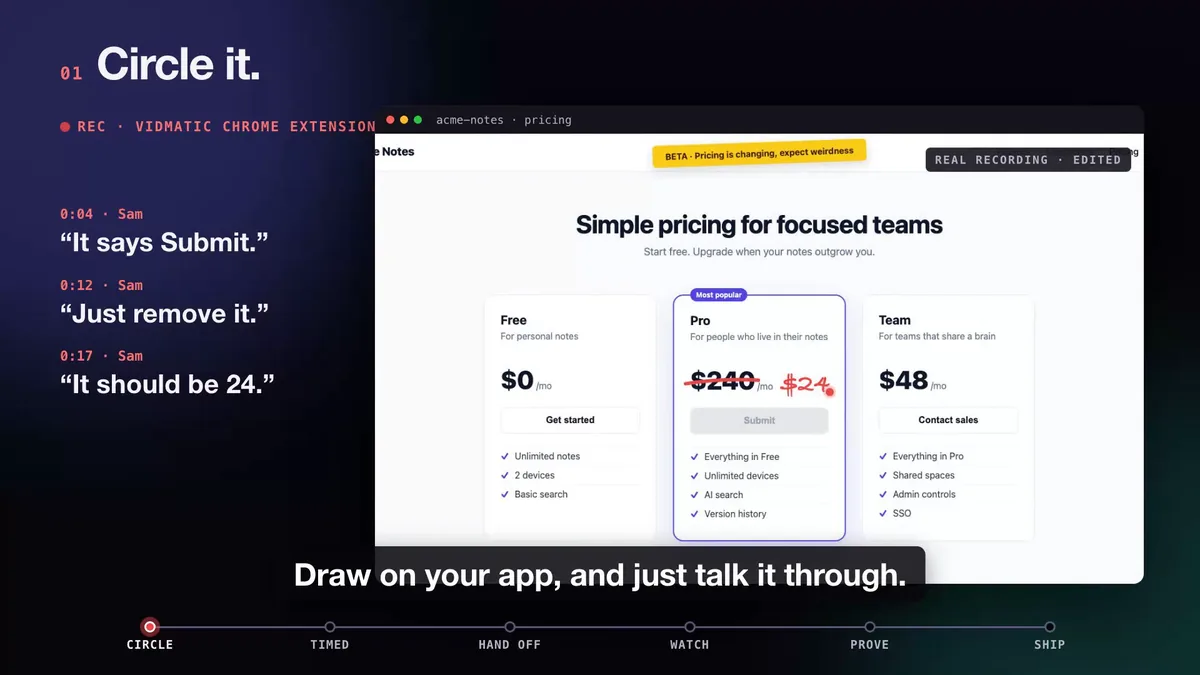 Three spoken asks, each with its own mark. Each mark reaches the agent with its time and its image.
The other difference is what happens after the agent reads the recording. In Vidmatic you paste one line from the recording's Give this to your agent panel, and your agent searches your repository on your machine and files one GitHub issue with a row per ask and the file and line where each lands. The walk-through is in Show your coding agent the bug. The agent then reports each stage to Agent Workstreams as it works, and on request records the bug before the fix and the same path after it, paired into one before and after video.
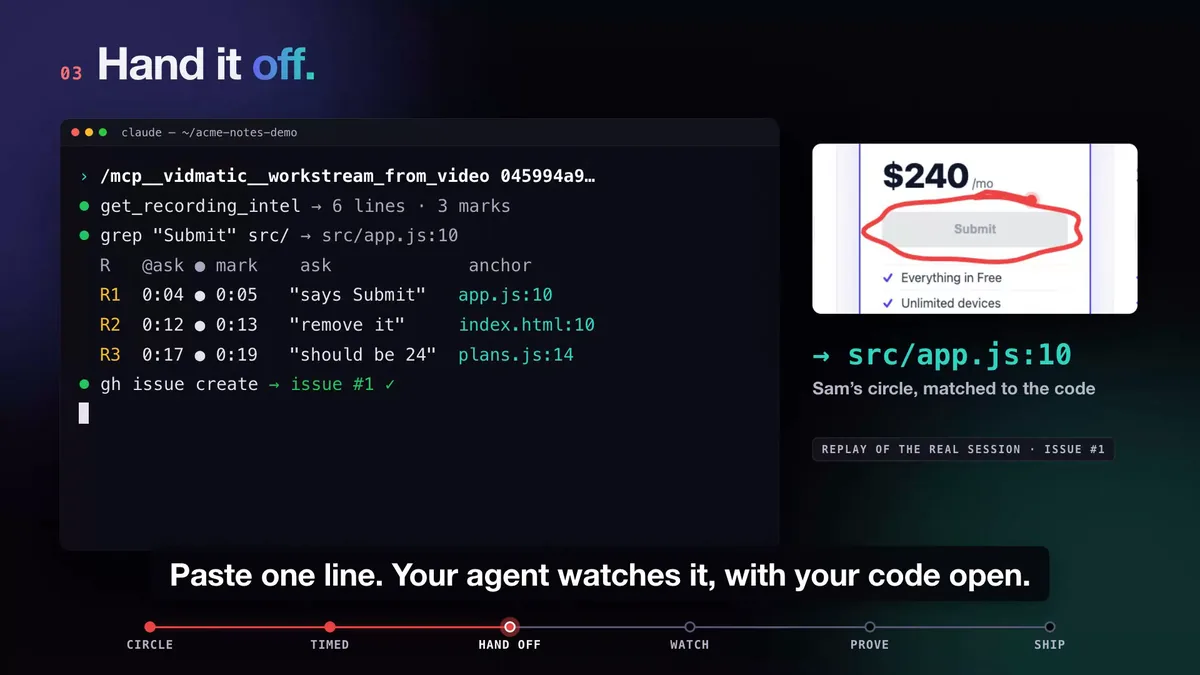 The circled Submit button lands on src/app.js:10, and one issue is filed.
Vidmatic vs Jam, side by side
As of October 2026, from Jam's MCP page, Jam's video docs and Jam's home page.
| Jam | Vidmatic | |
|---|---|---|
| Where you record | Chrome extension, iOS, Mac | Chrome extension |
| Console logs and network requests | Yes, on browser recordings | No |
| User events, device and browser info | Yes | No |
| Narration | Yes | Yes |
| Draw while recording | Yes, shapes fade after 3 seconds | Yes, each mark kept with its time |
| Agent reads transcript and frames | Yes, not for Instant Replay Jams | Transcript, plus an image of the screen with each mark |
| Agent reads the drawings as data | Not listed | Yes |
| Agent comments on the recording | Yes | Not listed |
| One-line handoff that files a grounded GitHub issue | Not listed | Yes |
| Live view of the agent's stages | Not listed | Yes |
| Paired before and after videos | Not listed | Yes |
How to pick
Pick Jam if your bugs live in console errors, failed requests or device details, if you want iOS and Mac recording, or if you want your agent to comment back on the report. That is a lot of evidence in one link, and Jam does it well.
Pick Vidmatic if your bugs live on the screen, in what you are pointing at, and you want the loop closed: show it once, watch the agent work, and get video proof it shipped. The full run is in Circle it. Say it. See it shipped., and the use case is bug report from video.
Some teams keep both: Jam for the bugs that live in the console, Vidmatic for the ones that live on the page. To try Vidmatic, connect once with the command on the screen recording MCP server page and record the next bug you would have described in a ticket.
Frequently asked questions
- What can a coding agent read from a Jam?
- A lot. Jam's MCP page lists tools for a Jam's details, console logs, network requests, user events, metadata, screenshots, video transcript, video chapters, frames and a video analysis tool. The video tools are not available for Instant Replay Jams.
- Can my agent comment on a Jam?
- Yes. Jam's MCP page lists tools to create, edit and delete comments, add reactions, rename and move Jams, and manage folders and recording links. The agent works with the same permissions you have in Jam.
- When is Jam the better choice than Vidmatic?
- When the bug lives in the browser's internals: a console error, a failed request, a device or network detail. Jam captures those on every browser recording. Vidmatic captures none of them.
- Does Jam let me draw on the screen while recording?
- Yes. Jam's video docs say you can pick the draw tool while recording, and drawn shapes fade away after 3 seconds. Jam's MCP page does not list a tool that returns those drawings as separate data.
- What does Vidmatic do that Jam does not list?
- It keeps every mark you draw as data with the second you drew it, and serves each mark with an image of the screen to your agent. It also gives you a one-line handoff that has the agent file one grounded GitHub issue, a live view of the agent's stages, and paired before and after videos.
Full video transcript
Third time explaining the same button. Your agent says it's done. Things get lost when someone retells what they saw. So stop retelling. Show it. Draw on your app, and just talk it through. Every word and every mark, pinned to the second. Paste one line. Your agent watches it, with your code open. You watch every step, as it happens. Then it films the proof. Before, and after. It ships, and the proof lands in your inbox. Ten minutes. Nothing lost in the handoff. Vidmatic. Video for your coding agent.
Try it on your next bug
Record the problem, hand it to your coding agent, and get a narrated demo of the fix.