Vidmatic vs Clipy vs Cap: three screen recorders your coding agent can read (2026)
Three recorders, three bets. Cap is open source and lets your agent drive the recorder. Clipy turns a recording into a structured brief. Vidmatic keeps what you pointed at and closes the loop to a shipped fix.
By Vidmatic · · 4 min read
If you are choosing a screen recorder so a coding agent can read what you recorded, three names come up: Clipy, Cap and Vidmatic. All three have something for agents, and they are good at different things.
Everything about Clipy and Cap below comes from their own pages, read on October 4, 2026: Clipy's home page, for agents page and Windows page, Cap's home page and Cap's agent docs. Clipy also has its own Clipy vs Cap comparison, worth reading for the recorder features this post skips.
Cap: open source, and your agent drives the recorder
Cap is an open source Loom alternative with native apps for macOS, Windows and Linux, a Chrome extension and a CLI. Recordings can stay local, go to your own S3 bucket or Google Drive, or go to Cap's cloud, and each one comes with an AI title, summary, chapters and a searchable transcript.
For agents, Cap ships a CLI and a local MCP server. Its docs say an agent can record your screen, upload and share, and read the title, summary, chapters, transcript and comments of a recording. Frames and drawn marks are not listed. If you want an agent to operate the recorder and your library, and you want the code open, Cap is the strongest of the three.
Clipy: a recording turned into a brief
Clipy's bet is a structured document per recording. Add .arec to a public Clipy link, or use its MCP server or agent skill, and the agent gets the extracted requests, key moments with frames and the real click targets where available, a draft plan, console messages and failed requests when they were captured, a list of what was not captured, and the timestamped transcript.
Clipy has its own answer to "which one did you mean": hold Control while you move the pointer and a highlight trail follows it, and the agent gets the real click targets where available. Clipy also lets agents record: headless capture from a URL, live sessions with the agent's own narration marks, and Mac screen recording. Its home page sums up the aim as: record the bug once, the agent opens the PR. If you want the recording pre-digested into a plan, Clipy is built for that.
Vidmatic: what you pointed at, and a closed loop
Vidmatic's bet is the pointing. You record in Chrome through the extension and draw on the page while you talk: circle the element, cross out what should go, write the right value by hand. Each mark is stored with the second you drew it, and your agent reads it over MCP next to the sentence you were saying, with an image of the screen with that mark on it.
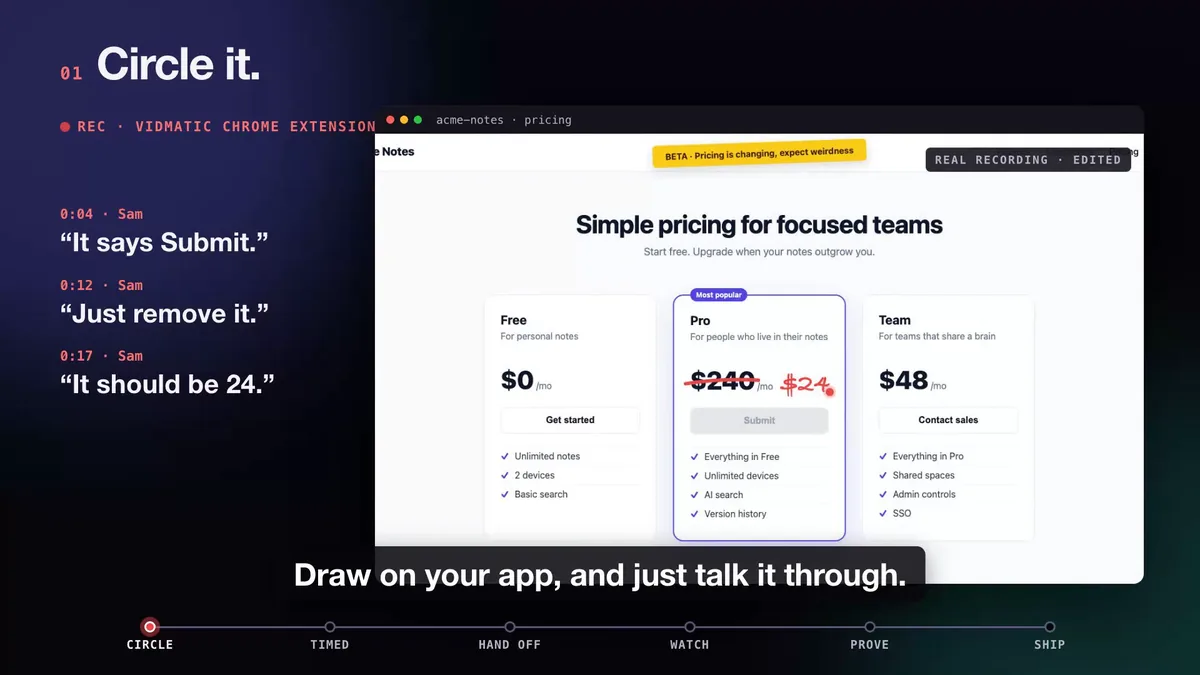 Three spoken asks, each with its own mark. The marks are what the agent reads first.
Then the loop. Paste one line from the recording's Give this to your agent panel and your agent searches your repository on your machine and files one GitHub issue, with the file and line for each ask. It reports each stage to Agent Workstreams while it works, and on request records the bug before the fix and the same path after it, paired into one before and after video. The whole run is filmed in Circle it. Say it. See it shipped.
 Same page, same path, same circle. Red before, green after.
Vidmatic vs Clipy vs Cap, side by side
| As of October 2026 | Cap | Clipy | Vidmatic |
|---|---|---|---|
| Open source | Yes | No, per Clipy's comparison | No |
| Where you record | macOS, Windows, Linux apps, Chrome extension, CLI | Mac app, Windows app per its Windows page, Chrome extension, web | Chrome extension |
| Agent reads | Title, summary, chapters, transcript, comments | Requests, key moments with frames and click targets, draft plan, transcript | Timed transcript, every drawn mark with its time and an image |
| Pointing kept for the agent | Not listed | Click targets and a pointer highlight trail | Every drawn mark, as data with its time |
| Console and network | Not listed | Console messages and failed requests, when captured | No |
| Agent records the screen | Yes, CLI and MCP | Yes, headless, live or Mac | Before and after halves of a fix |
| Agent files a grounded GitHub issue | Not listed | Draft plan; its home page says the agent opens the PR | Yes, one line |
| Live view of the agent's stages | Not listed | Not listed | Yes |
| Before and after proof | Not listed | Yes, BEFORE and AFTER chapters in one recording (Clipy) | Two recordings paired per issue |
| Bring your own storage | Yes | Not listed | No |
Who each one fits
Pick Cap if open source or your own storage is a requirement, if you record on Linux, or if you want your agent to run the recorder and manage your library.
Pick Clipy if you want each recording turned into a structured brief with click targets and a draft plan, and you are happy to take it from there.
Pick Vidmatic if the bug is in what you were pointing at and you want the loop closed: show it once, watch the agent work, get video proof it shipped. Connect once with the command on the screen recording MCP server page, and the use case is screen recording for AI coding agents.
Frequently asked questions
- Is Cap open source?
- Yes. Cap's home page says it is fully open source on GitHub, and you can keep recordings local or connect your own S3 bucket or Google Drive. Vidmatic and Clipy are not open source.
- What does Clipy give a coding agent?
- An agent-readable document for a recording, reached by adding .arec to a public Clipy link or through its MCP server. Clipy's page lists extracted requests, key moments with frames and click targets, a draft plan, diagnostics when captured, capture gaps and a timestamped transcript.
- Can my coding agent record the screen itself?
- With Cap and Clipy, yes. Cap's CLI and local MCP let an agent record, upload and share. Clipy lists headless capture from a URL, live sessions and Mac screen recording. Vidmatic's agent records the before and after halves of a fix by driving your running app in a headless browser on its machine.
- Which one works on Windows and Linux?
- Cap lists native apps for macOS, Windows and Linux plus a Chrome extension. Clipy lists a Mac app, a Chrome extension and web recording, and its Windows page offers a Windows 10 and 11 installer. Vidmatic records through its Chrome extension.
- Which one keeps what I drew on the screen?
- Vidmatic. Every mark you draw is stored with the second you drew it, and your agent reads it with an image of the screen. Neither Cap's nor Clipy's pages list drawn marks as data; Clipy instead keeps click targets where available and offers a pointer highlight trail while you record.
Full video transcript
Third time explaining the same button. Your agent says it's done. Things get lost when someone retells what they saw. So stop retelling. Show it. Draw on your app, and just talk it through. Every word and every mark, pinned to the second. Paste one line. Your agent watches it, with your code open. You watch every step, as it happens. Then it films the proof. Before, and after. It ships, and the proof lands in your inbox. Ten minutes. Nothing lost in the handoff. Vidmatic. Video for your coding agent.
Try it on your next bug
Record the problem, hand it to your coding agent, and get a narrated demo of the fix.