Best MCP servers for Claude Code in 2026, plus the category every list skips
The usual six cover code, docs, the browser, errors, tickets and designs. None of them can read the screen recording a teammate sends you. Here is the list, with sources, and the missing row.
By Vidmatic · · 4 min read
Most "best MCP servers for Claude Code" lists put the same names near the top: GitHub, Context7, Playwright, and often Sentry and a ticket tracker. They are right to. Those servers cover where code, docs, pages, errors and work items live.
We read five of the ranked lists on October 4, 2026, from Nimbalyst, Firecrawl, DeployHQ, Totalum and Dupple. Between them they name about thirty different servers. Not one of them reads a screen recording. That is the row this post adds, after the six servers most setups actually start with.
The six most Claude Code setups start with
Each description below comes from the server's own page, as of October 2026.
- GitHub MCP server. Reads repositories and code, manages issues and pull requests, and reaches Actions and code security through toolsets you switch on and off. GitHub hosts a remote version, or you run it locally.
- Context7. Pulls current, version-specific documentation and code examples for a library into the prompt, so the agent stops writing calls to APIs that changed two versions ago.
- Playwright MCP. Drives a real browser through the accessibility tree instead of pixels. It can take screenshots and save a video of its own session to a file.
- Sentry MCP. Searches errors, analyzes performance and triages issues in your Sentry projects, over a hosted server with OAuth.
- Linear MCP. Works with your Linear issues, projects and comments through a hosted server, with a one-line Claude Code setup on that page.
- Figma MCP server. Brings variables, components and layout from your Figma files into the editor so generated code matches the design.
Install the ones that match where your work lives. A server you never call still costs context on every turn.
The missing category: servers that read a video
Here is the gap. A teammate records a bug: thirty seconds, their voice, their cursor on the broken thing. Claude Code reads text and images, not video, so that recording is the one piece of the handoff your agent cannot open. The longer story is in Can Claude Code read a video?.
An MCP server can close that gap by turning the recording into things Claude Code does read: a transcript with times, and frames. Three servers that do it today, each described from its own page:
| As of October 2026 | Where the recording lives | What Claude Code gets | Runs where |
|---|---|---|---|
| talkthrough-mcp | A local video or audio file, or one public video URL | Timestamped transcript, scene-change keyframes, on-screen text by OCR, optional speaker labels | Your machine, open source (MIT) |
| Jam MCP | A Jam recorded with Jam's extension or apps | Video transcript, chapters, frames, a video analysis tool, plus console logs, network requests and user events | Jam's hosted service |
| Vidmatic | A recording made with the Vidmatic Chrome extension | Timed transcript, every mark you drew with the second you drew it, an image of the screen with each mark on it | Vidmatic's hosted service |
They suit different jobs. talkthrough-mcp is the pick when the recording is already a file on your disk and nothing may leave your machine. Jam is the pick when the bug lives in console errors and failed requests, which Jam captures and Vidmatic does not.
Vidmatic is built for the case where the bug is in what you were pointing at. You circle the element while you talk, and the circle is kept as data with its time, so "this button" in the transcript lands on one button.
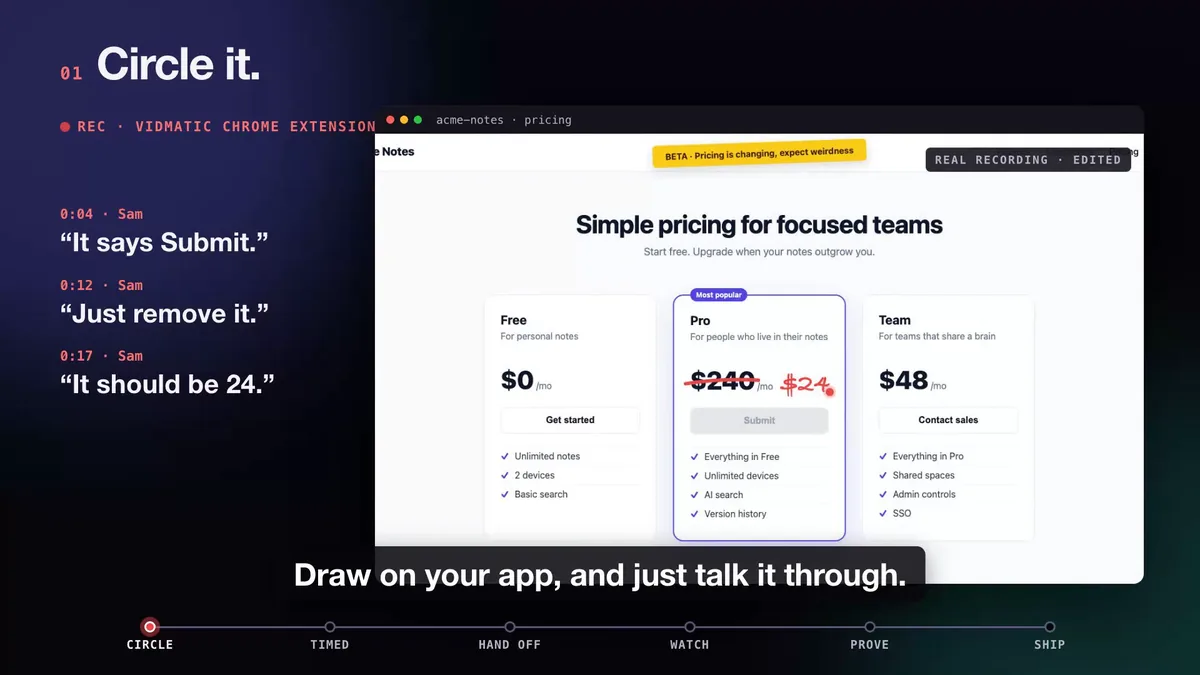 Three spoken asks, each with its own mark. A transcript with frames keeps the words; the marks keep the pointing.
What a video server adds to the other six
The six servers above let your agent read your code, your docs, your errors and your tickets, and drive a browser. A video server adds the one input that comes from a person: what they saw and said when it went wrong. Paired with GitHub, it closes a loop. In Vidmatic your agent reads the recording, searches your repository on your machine and files one grounded issue, and the step by step is in Show your coding agent the bug.
 The words at 0:04, the circle at 0:05. This is what the agent reads.
Be honest about the limits before you add it. Vidmatic records in Chrome through its extension, captures no console logs or network requests, and is not open source or self-hostable. If you need those, the table above has better picks.
Add the video row
If your team already hands bugs around as recordings, the screen recording MCP server page has the one command to connect Vidmatic to Claude Code, and the broader use case is on screen recording for AI coding agents. Keep the other six. They do their jobs well.
Frequently asked questions
- Which MCP servers should I add to Claude Code first?
- Start from where your work lives. Most setups begin with GitHub for issues and pull requests, Context7 for current library docs, and Playwright for driving a browser. Add Sentry, Linear or Figma when your errors, tickets or designs live there. Each one costs context, so add servers you will actually call.
- Which MCP servers turn a screen recording into something Claude Code can read?
- Not watch, but read. Claude Code reads text and images, so a video server hands it a transcript, still frames, or both. talkthrough-mcp does this locally from a file, Jam's MCP serves transcripts and frames from a Jam, and Vidmatic serves the transcript, the marks you drew and an image of each mark.
- Is Playwright MCP enough to show Claude Code a UI bug?
- It is enough for the agent to look at a page itself. Playwright MCP drives a browser through the accessibility tree and can take screenshots. It cannot tell the agent what you saw and said when you hit the bug, which is what a recording carries.
- Do too many MCP servers slow Claude Code down?
- Every connected server adds its tool descriptions to the context, so a long list costs tokens on every turn and gives the agent more tools to choose between. Keep the servers you use weekly connected and add the rest per project.
- What does an MCP server cost?
- Mostly whatever the product behind it costs. A server gives your agent access to your GitHub, Sentry, Linear or Figma account, so your plan there sets what it can reach, and Context7's free API key raises its rate limits, with a paid plan for a larger monthly quota. Check each product's own pricing page, since plans change.
Full video transcript
Third time explaining the same button. Your agent says it's done. Things get lost when someone retells what they saw. So stop retelling. Show it. Draw on your app, and just talk it through. Every word and every mark, pinned to the second. Paste one line. Your agent watches it, with your code open. You watch every step, as it happens. Then it films the proof. Before, and after. It ships, and the proof lands in your inbox. Ten minutes. Nothing lost in the handoff. Vidmatic. Video for your coding agent.
Try it on your next bug
Record the problem, hand it to your coding agent, and get a narrated demo of the fix.