Can Claude Code read a video? 4 ways to give Claude Code a video (2026)
You recorded the bug. Your agent reads text and images, not video. Here are the four ways to close that gap today, what each one keeps, and what each one quietly throws away.
By Vidmatic · · 5 min read
You recorded the bug. Thirty seconds, your voice explaining it, the cursor hovering over the thing that is wrong. Then you paste the file path into Claude Code and it tells you, politely, that it cannot watch videos.
That is still true in October 2026. Claude Code reads text and images. Native video input is an open feature request (anthropics/claude-code #12676, and a later one about screen recordings for UI bug reports, #80865). So every way to give Claude Code a video is really a way to turn the video into something it can read. The four below differ in what survives that translation.
What a coding agent actually needs from a recording
Before comparing tools, it helps to name the three things a screen recording carries that a text ticket does not:
- What you said, in order. "This button should say Upgrade, not Submit."
- What you pointed at while you said it. "This button" only means something if the agent knows which one.
- When things happened. A flicker at 0:07, a total that changes after the second click. Order is evidence.
Any method that drops one of these makes your agent guess. Keep that list in mind for each option.
Way 1: paste screenshots
Pause the video at the frame that shows the problem, take a screenshot, and drop it into Claude Code. It reads images well, and for a static problem (a misaligned label, a wrong price) this is often enough.
Keeps: what the screen looked like at one moment. Loses: your voice, the order of events, and everything between frames. Three screenshots and a paragraph of explanation is a text ticket with pictures, which is the thing you were trying to avoid.
Way 2: paste the transcript
If your recorder transcribes (most do now), copy the transcript into the chat. The agent gets your words in order, which is a real improvement over a hand-written summary.
Keeps: what you said, often with timestamps. Loses: what you were pointing at. "This one is wrong" with no image is the classic failure: the agent has to guess which "this", and it guesses with total confidence.
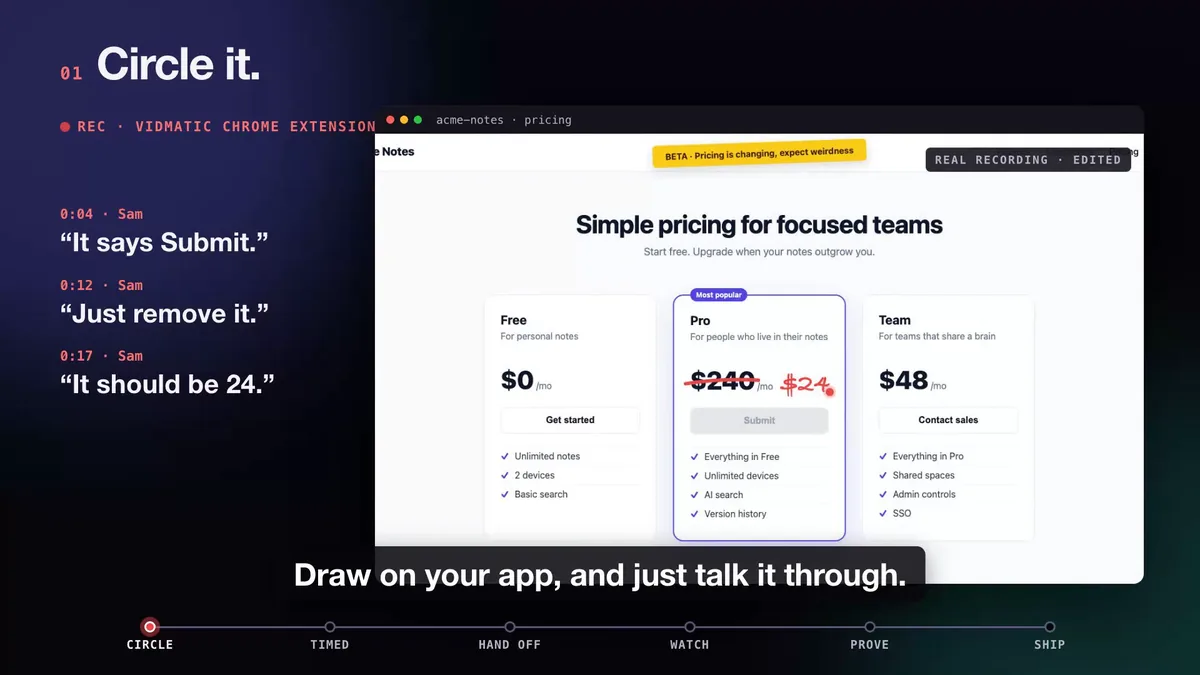 Three spoken asks, each with its own mark. A transcript alone keeps the words and drops the circles.
Way 3: a local skill that extracts frames and transcript
Several open-source Claude Code skills now do the extraction for you. The pattern is the same: point the skill at a video file or URL, it runs ffmpeg to pull frames, runs a speech model to transcribe the audio, and hands Claude both, lined up by time. If you want everything to stay on your laptop, this is the right family to look at.
Keeps: words, frames and timing. Loses: intent. The skill picks frames by time or by scene change, not by what you meant to point at, so the agent still has to work out which element in a busy frame is the subject. You also own the setup: ffmpeg, a transcription model, and the disk space for both, on every machine that runs the agent.
Way 4: an MCP server that serves the recording as data
The fourth way moves the work off your machine. You record with a tool that stores the transcript, the frames and your on-screen marks, and your agent reads them over MCP. This is how Vidmatic does screen recording for AI coding agents: you record with the Chrome extension, talk, and draw on the page with the pen while you talk. Your agent calls the recording tools and gets:
- A timed transcript of what you said.
- Every mark you drew, a circle, an arrow, a cross or handwriting, with the second you started it and the second you confirmed it, so each mark carries the sentence you were saying.
- An image of the screen with each mark drawn on it, so the agent sees which element you circled instead of guessing from words.
 0:04 the words, 0:05 the circle. The mark carries the sentence that was spoken while it was drawn.
Keeps: words, timing and intent. When your words and your drawing disagree, the drawing wins, because people misspeak while they point and the mark is usually the precise part. Costs: a hosted service has your recording (your code stays on your machine; the agent reads your repository locally).
Side by side
| Way | Your words | What you pointed at | Order of events | Runs on your machine |
|---|---|---|---|---|
| 1. Screenshots | No | Partly, one frame | No | Nothing |
| 2. Transcript | Yes | No | Yes | Nothing |
| 3. Local extraction skill | Yes | Frames, not intent | Yes | ffmpeg and a speech model |
| 4. MCP server with marks | Yes | Yes, each mark with its image | Yes | Nothing |
What Claude Code does with it next
Reading the video is only the first step. Once the agent has the recording, the useful question is what it does with it. With the Vidmatic MCP, every recording has a Give this to your agent panel with one line to paste:
/mcp__vidmatic__workstream_from_video <recording id>
Your agent reads the transcript and each mark, searches your repository, and writes one issue with one row per ask and the file and line where it lands. If it cannot find an anchor it says so rather than inventing one.
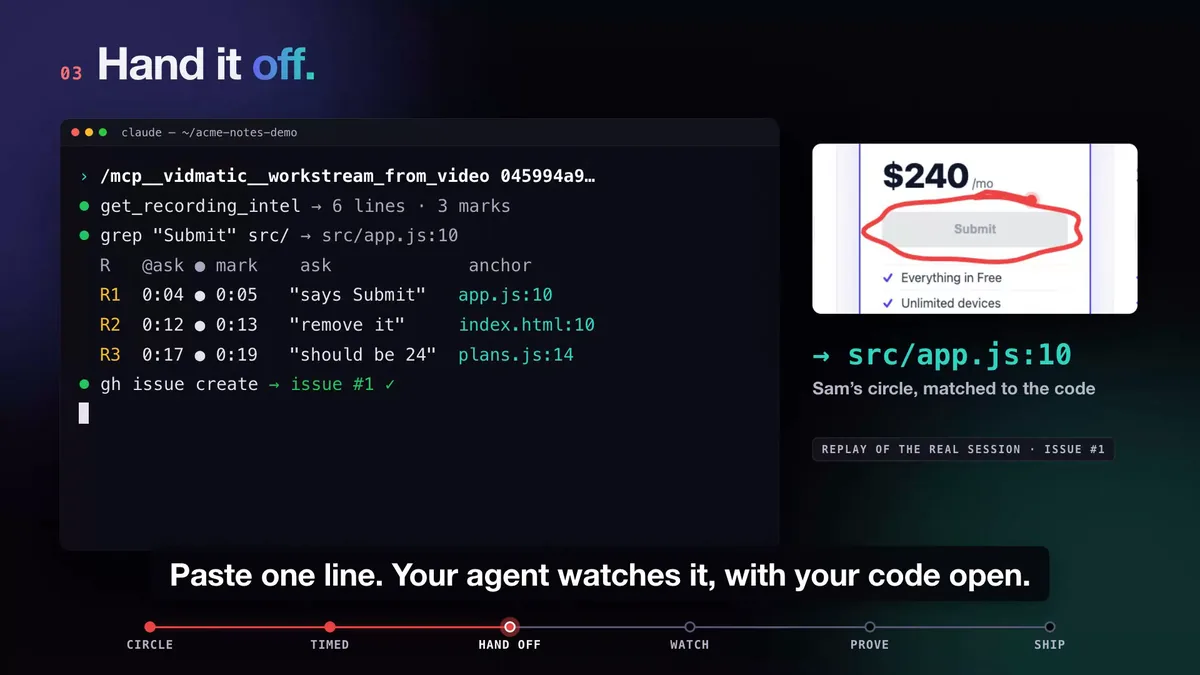 The circled Submit button lands on src/app.js:10, and one issue is filed.
From there it builds, reports each stage live, and can record a before and after video of the fix. The whole loop, filmed on a real change, is in Circle it. Say it. See it shipped.
Which way should you pick?
- A single static glitch: a screenshot is fine.
- You want everything local and you are happy to maintain ffmpeg and a speech model: a local skill.
- You record bugs often, the bug is in where you are pointing, or you want the agent to file the issue and prove the fix: an MCP server that serves marks.
To try the fourth way, connect once and sign in in the browser; there is no key to paste. The screen recording MCP server page has the command and the list of skills.
Frequently asked questions
- Can Claude Code open an mp4 or webm file?
- Not as video. As of October 2026 Claude Code reads text and images, and native video input is still an open feature request in the anthropics/claude-code repository. Anything you want it to see in a recording has to arrive as a transcript, as images, or both.
- What is the fastest way to show Claude Code a bug on screen?
- For one static problem, a screenshot dropped into the chat. For anything that happens over time, like a flicker, a sequence of clicks or a value that changes, a recording read as a timed transcript plus frames keeps the order of events that a single screenshot loses.
- Do I need ffmpeg to give Claude Code a video?
- Only if you extract frames yourself, or use a local skill that does. With the Vidmatic MCP nothing runs on your machine: transcription and frame images are made on Vidmatic's servers and your agent pulls them over MCP.
- How does Claude Code know which part of the screen I meant?
- A transcript alone cannot tell it, because the word here has no position. Marks fix that. In Vidmatic every circle, arrow or cross you draw is stored with the second you drew it, and your agent gets an image of the screen with that mark drawn on it, next to the sentence you were saying.
- Does this work with agents other than Claude Code?
- Any agent that can connect to a remote MCP server can call the Vidmatic tools. In Claude Code the steps are slash commands; other agents call get_skill with the workflow name and follow the same steps.
Full video transcript
Third time explaining the same button. Your agent says it's done. Things get lost when someone retells what they saw. So stop retelling. Show it. Draw on your app, and just talk it through. Every word and every mark, pinned to the second. Paste one line. Your agent watches it, with your code open. You watch every step, as it happens. Then it films the proof. Before, and after. It ships, and the proof lands in your inbox. Ten minutes. Nothing lost in the handoff. Vidmatic. Video for your coding agent.
Try it on your next bug
Record the problem, hand it to your coding agent, and get a narrated demo of the fix.