Bug report MCP servers compared: the ones that read video (2026)
Most bug report MCP servers hand your agent text and screenshots. A few read the recording itself. Here is what each one gives the agent, where it runs, and which job it suits.
By Vidmatic · · 3 min read
A bug report MCP server saves you one tedious step: copying a report into your coding agent piece by piece. The agent fetches the report itself, by its link, and reads what is in it.
What is in it varies a lot. Some servers hand over screenshots and logs. A few read the recording itself. If the bug you are handing off was recorded on video, that difference decides how much of it your agent actually sees.
Five servers, from their own pages
Each description comes from the server's own documentation, read on October 4, 2026.
Jam. The broadest by far. Jam's MCP lists tools for a Jam's console logs, network requests, user events, metadata and screenshots, and for video recordings a transcript, chapters, frames and a video analysis tool (not for Instant Replay Jams). The agent can also comment and organize Jams.
BetterBugs. You paste a BetterBugs report link and the agent gets the report bundled with its details, including a screenshot, console logs, network requests, events, a summary and steps to reproduce. The agent can also update a report's title, status, priority, tags and comments. Its MCP overview does not list reading the video itself.
ClipSense. Built for mobile apps. You upload a screen recording of a React Native, iOS or Android bug, and ClipSense analyzes it frame by frame in its cloud and returns a timeline, a root cause and fix suggestions. Files up to 500MB and 10 minutes.
talkthrough-mcp. Open source (MIT) and local-first. It turns a local video or audio file into a timestamped transcript, scene-change keyframes, on-screen text by OCR and optional speaker labels, and the agent pulls the slice it needs. Nothing is uploaded for local files.
Vidmatic. You record with the Chrome extension and draw on the page while you talk. The agent gets the timed transcript, every mark you drew with the second you drew it, and an image of the screen with each mark on it.
Side by side
| As of October 2026 | Jam | BetterBugs | ClipSense | talkthrough-mcp | Vidmatic |
|---|---|---|---|---|---|
| Reads the video | Transcript, chapters, frames | Not listed | Cloud frame analysis | Transcript, keyframes, OCR | Transcript, marks with images |
| Console and network logs | Yes | Yes | Not listed | Not listed | No |
| Drawn marks as data | Not listed | Not listed | Not listed | Not listed | Yes |
| Agent writes back | Comments, organize | Updates report fields | Not listed | Speaker labels | Files one GitHub issue |
| Runs where | Hosted | Hosted | Hosted | Your machine | Hosted |
| Best fit | Web bugs with technical context | Web bugs with technical context | Mobile app bugs | Files already on disk, nothing leaves the machine | Bugs in what you point at |
MarkLayer has its own comparison of feedback and annotation tools with MCP servers, if your reports start as comments on a web page rather than as recordings.
Why the pointing matters
A bug recorded for a person sounds like "if I click here, this total is wrong." A transcript keeps the words. Frames keep the screen. Neither says which of the totals on screen "this" was, so the agent picks one.
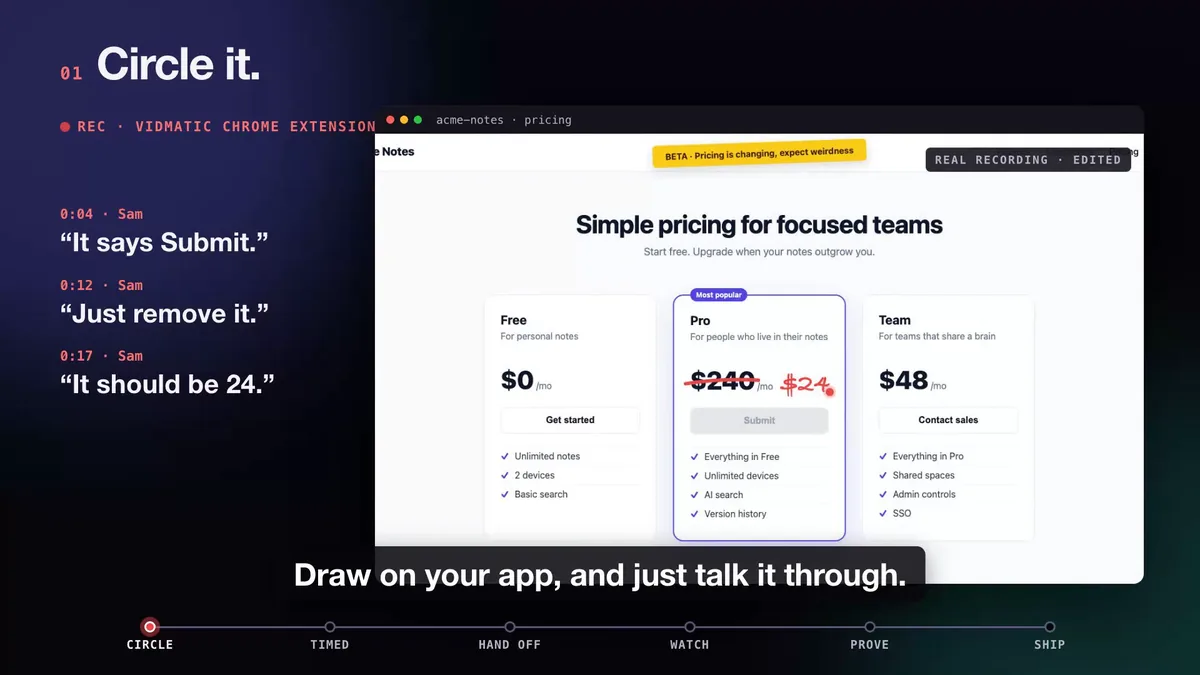 Three spoken asks, each with its own mark. The mark tells the agent which element each sentence means.
That is the gap Vidmatic is built for. Each circle, cross or handwritten value is stored with its time, so the agent reads "this total is wrong" next to an image with that total circled. When your words and your drawing disagree, the drawing wins. How Claude Code reads it is covered in Can Claude Code read a video?, and the use case is bug report from video.
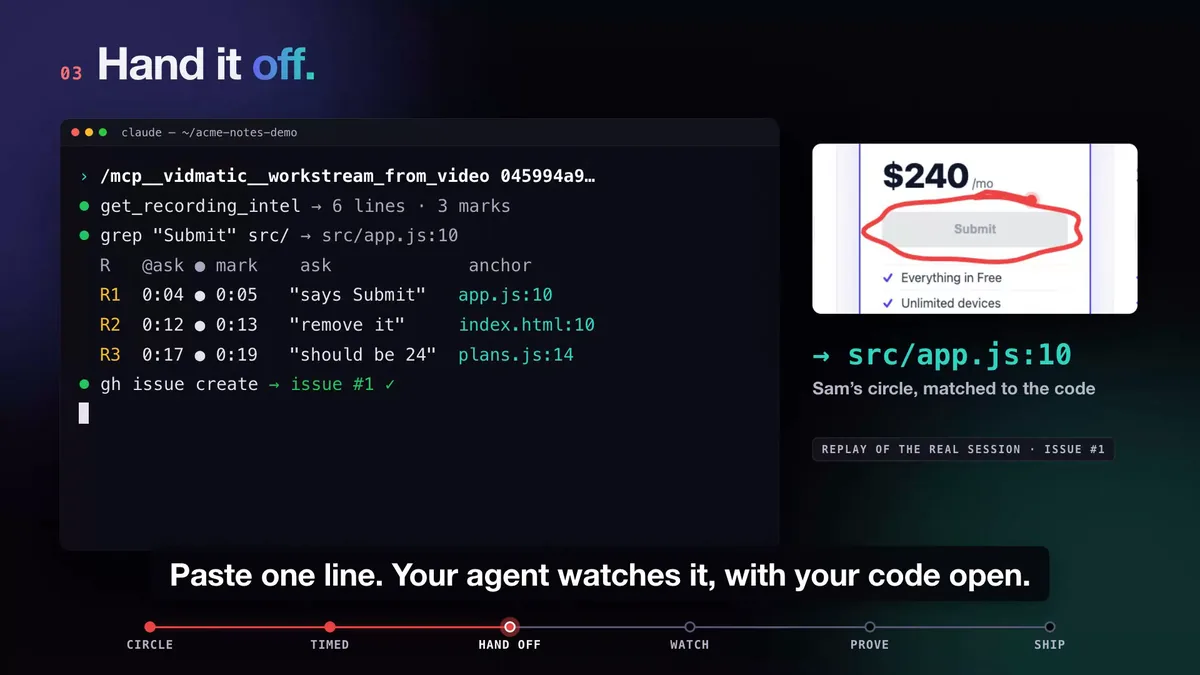 The circled Submit button lands on src/app.js:10, and one issue is filed.
Which one to use
- Your bugs show up in the console or the network tab: Jam or BetterBugs.
- Your bugs are in a mobile app: ClipSense.
- The recording is a file and must not leave your machine: talkthrough-mcp.
- Your bugs are on the screen and you want the agent to file the issue and show you proof: Vidmatic. Connect it with the command on the screen recording MCP server page.
Frequently asked questions
- What is a bug report MCP server?
- A server that lets a coding agent fetch a bug report directly, over the Model Context Protocol, instead of you pasting screenshots and logs into the chat. The agent asks for a report by its link or ID and gets back its contents as text and images.
- Which bug report MCP servers can read a video?
- Of the servers compared here, as of October 2026, Jam serves a video transcript, chapters and frames; ClipSense analyzes an uploaded mobile video in its cloud; talkthrough-mcp turns a local file into a transcript, keyframes and OCR; and Vidmatic serves a transcript with your drawn marks. BetterBugs' MCP overview lists screenshots and logs.
- Which one should I use for mobile app bugs?
- ClipSense is built for them: its page names React Native, iOS and Android, and it accepts video files up to 500MB and 10 minutes. talkthrough-mcp also works with any local video file, including a phone screen recording.
- Can a bug report MCP server run fully on my machine?
- talkthrough-mcp does. Its page says transcription, keyframes and OCR run locally and nothing is uploaded for local files. The others in this comparison are hosted services.
- Which of these capture console logs and network requests?
- Jam and BetterBugs list console logs and network requests in what their MCP servers return. ClipSense and talkthrough-mcp do not list them, and Vidmatic does not capture them.
Full video transcript
Third time explaining the same button. Your agent says it's done. Things get lost when someone retells what they saw. So stop retelling. Show it. Draw on your app, and just talk it through. Every word and every mark, pinned to the second. Paste one line. Your agent watches it, with your code open. You watch every step, as it happens. Then it films the proof. Before, and after. It ships, and the proof lands in your inbox. Ten minutes. Nothing lost in the handoff. Vidmatic. Video for your coding agent.
Try it on your next bug
Record the problem, hand it to your coding agent, and get a narrated demo of the fix.