How Linear works with coding agents, and 7 things Vidmatic is missing (2026)
In August, Linear's coding agent started taking screenshots to prove its own work. We build proof for coding agents, so we studied how Linear works and why people love it. Here is what we learned, and the seven things we are missing.
By Vidmatic · · 8 min read
On August 20, 2026, Linear's coding agent started doing something new. After it finished a change, it opened the product in a browser, went to the page it had touched, and attached before-and-after screenshots to the review (changelog). Nobody had asked the agent to prove its work. Linear decided it should.
We noticed because we build Vidmatic, a screen recorder for coding agents. You circle what is wrong on your screen and say what you want. Your agent reads the recording, fixes it while you watch, and sends you a narrated video of the fix. Proof is our whole product. Watching the tool so many fast software teams use arrive at the same idea from the other side was the moment we decided to study it properly.
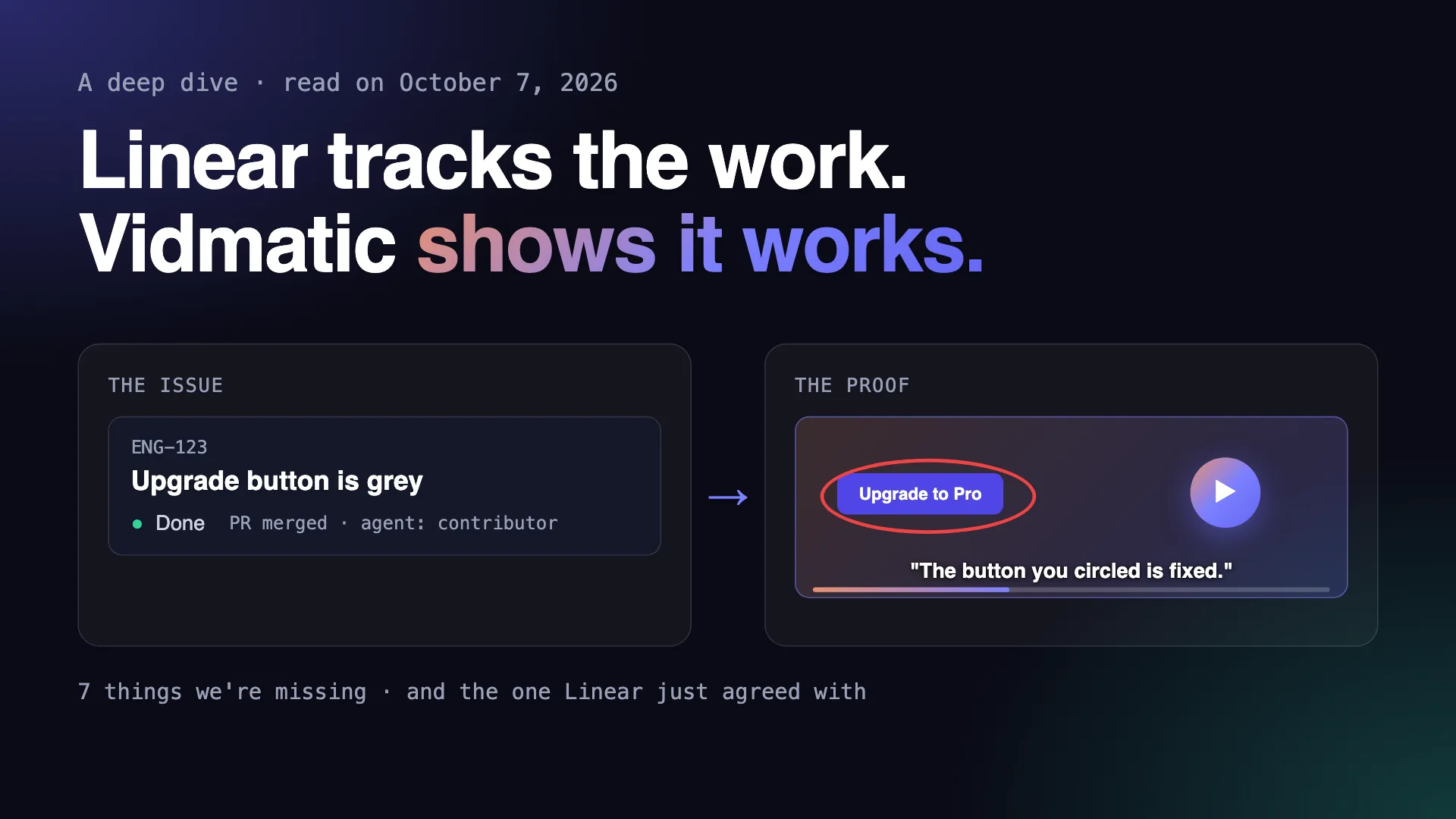 Two halves of the same promise: the issue says Done, the video shows it.
Linear earns the attention. In March its CEO Karri Saarinen opened a page with four words, Issue tracking is dead, arguing that trackers were built "for a handoff model of software development" and that the next system "is designed around context and agents." People do not just use Linear. They talk about it the way they talk about a good knife. So we read its site, docs, changelog and essays, and the Hacker News threads where users explain why they stay, all on October 7, 2026, and linked where they appear. This post is what we learned, and the seven things we are missing.
How work moves through Linear
Work comes in from people, from Slack, and from support tools like Intercom and Zendesk, and lands in Triage, which Linear's docs call "a special inbox for your team" (docs). Each decision is one key: 1 accepts, 2 declines, H snoozes. Linear also suggests who should own an issue, which labels it needs and which older issues it may duplicate (Triage Intelligence), and since September 2025 it can apply the owner and label suggestions by rule (changelog).
Accepted work goes into cycles, repeating blocks of one to eight weeks where unfinished items "roll over automatically" (docs). Issues roll up into projects, projects into company goals Linear calls initiatives, and since April 2026 releases are tracked from the build with release notes an agent writes (changelog).
And since May 2025, agents are "full members of your Linear workspace". You assign them, add them to projects or @mention them, just like a person (Linear for Agents). Cursor, Codex, Devin, Sentry, Factory and others plug in, and Linear's own agent can now write code in the cloud using Claude Code or Codex.
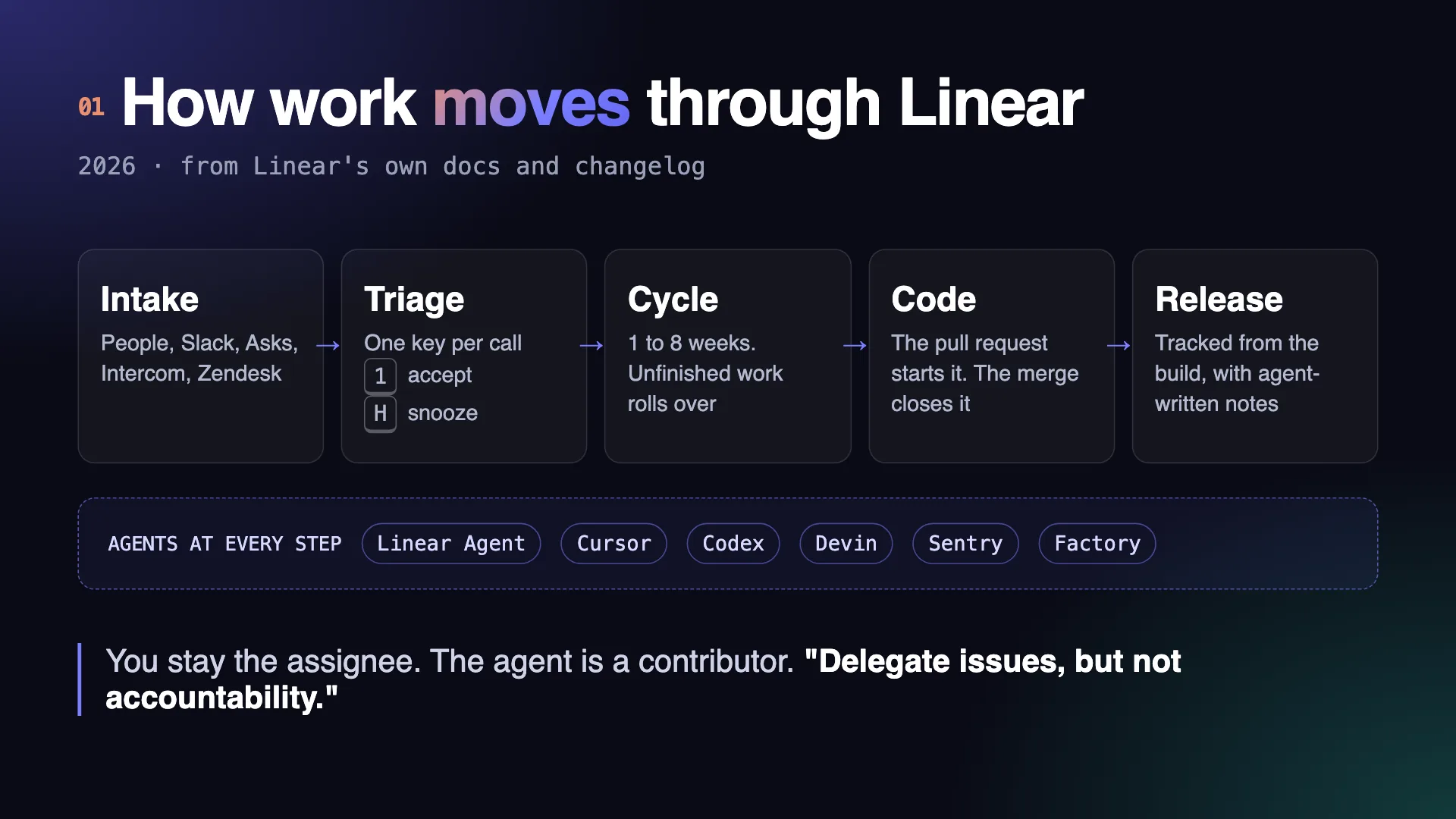 How work moves through Linear in 2026. Agents are assigned like people at every step.
Six things people love about Linear
1. It is fast, so people keep it up to date
Linear keeps a copy of your workspace in the browser and applies every change there first, then syncs it to the server, which passes it on to everyone else. Pages barely load because they are already there (a technical breakdown). One Hacker News user called it "crazy fast and snappy" (thread). Speed matters for a boring reason: when updating an issue costs nothing, people actually update it.
2. Your hands never leave the keyboard
Cmd+K opens a menu for every action. C creates an issue. G then a letter jumps anywhere. "The keyboard shortcuts and navigation are super fun and very useful," wrote another user (thread).
3. It has opinions, and writes them down
The Linear Method opens with "There is a lost art of building true quality software." It tells you to write issues, not user stories, to scope projects down, and to launch and keep launching. Opendoor's Kaz Nejatian puts it on Linear's home page: "It has the right opinions for fast moving teams." You do not configure Linear into a way of working. You adopt one.
4. You can feel the care
Linear fixes bugs within seven days as a policy (Why is quality so rare?) and spent two years of Wednesdays on "more than 1,000 small acts of polish" (Quality Wednesdays). The best summary came from a user: "we mainly want to not notice the software, which is something that every competitor gets wrong" (thread).
5. The code moves the issue
A developer's change goes up for review as a pull request, the bundle of code a teammate checks before it goes into the product. Open one and the linked issue moves to In Progress. Merge it, which means accept it into the product, with "Fixes ENG-123" in the description, and the issue moves to Done (GitHub docs). Nobody drags a card. The tracker stays true because it follows the code instead of asking people to report on it.
6. Agents are teammates, and a person stays accountable
When you hand an issue to an agent, you stay the main assignee and the agent joins as a contributor. Linear's line for it is the sentence we keep quoting: "Delegate issues, but not accountability." The same page adds: "Agents act on your behalf, but never in the dark."
Where Linear meets Vidmatic
Which brings us back to August 20. When Linear's agent tests its work "where users experience it: in the browser" and captures "before-and-after screenshots, making visual changes easier to review alongside the code", Linear is saying out loud what Vidmatic is built on: when an agent does the work, the person accountable needs to see it work. That line about accountability only holds if accountability comes with evidence.
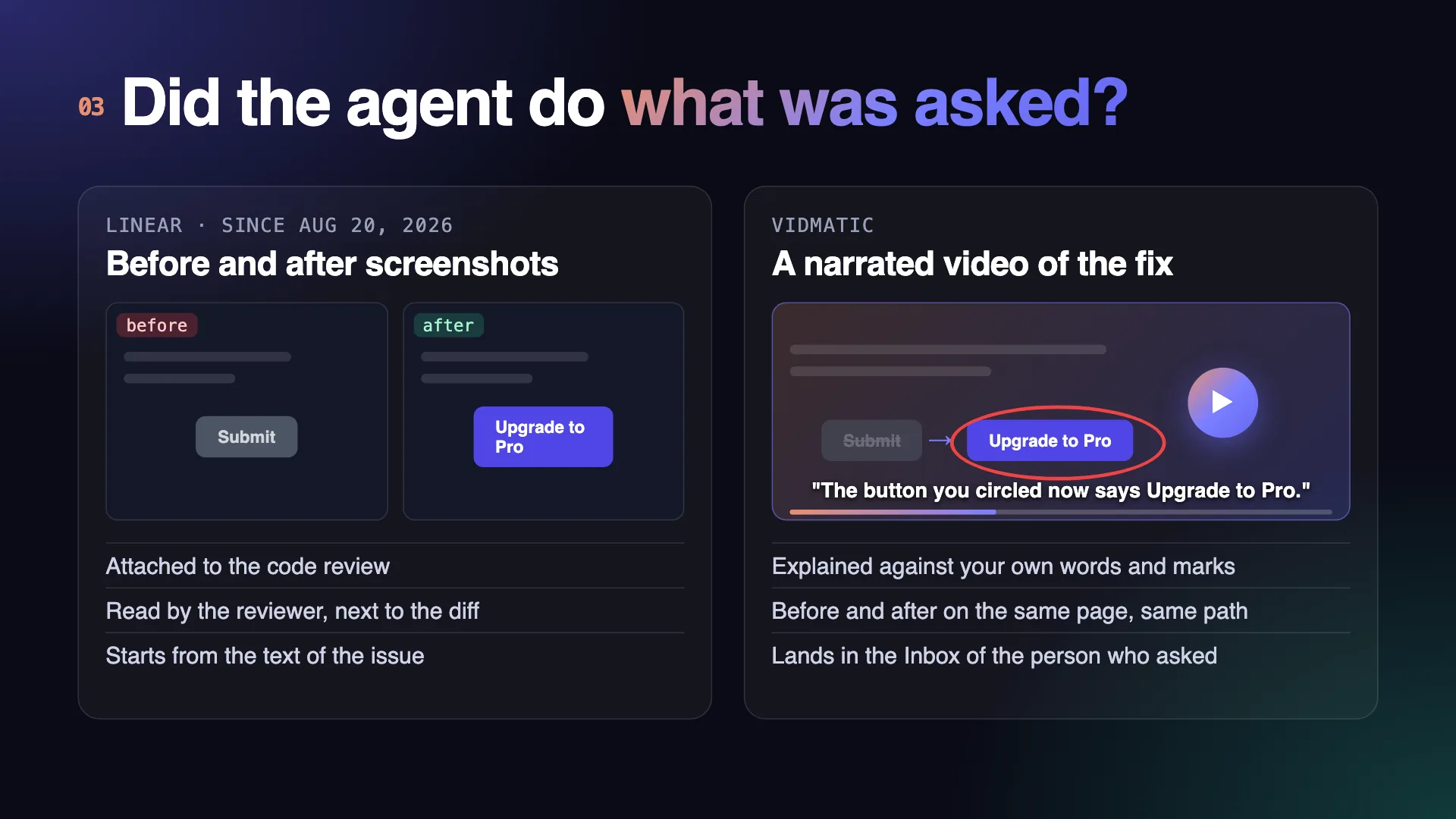 Two answers to the same question: did the agent's change do what was asked?
Screenshots answer the reviewer's question. We built for the person who asked. Here is what a Vidmatic loop adds on each end:
- The ask is a recording, not a paragraph. You circle the broken button and say what you want. Your agent reads the transcript, your marks and a zoomed image of each circle, then files one GitHub issue grounded in your code. An issue in a triage queue starts as someone's description of what they saw. Ours starts as the recording of it, and the issue is written from that.
- The proof is narrated, and checked against the ask. The fix comes back as a video that walks the same page, explains in plain words what changed and why, and pairs the before with the after.
- It lands with the person who asked. The demo goes to their Inbox, not only into the code review.
- You watch it happen. Agent Workstreams shows each stage of your agent's work live, from plan to ship, even though the agent runs on your own laptop.
What Vidmatic is missing
We held Vidmatic up against everything above. Some of it is not our job: we will not build cycles, estimates or initiatives, because Linear does them well and we would rather fit next to it. But seven gaps are real, and we checked each one against our own code.
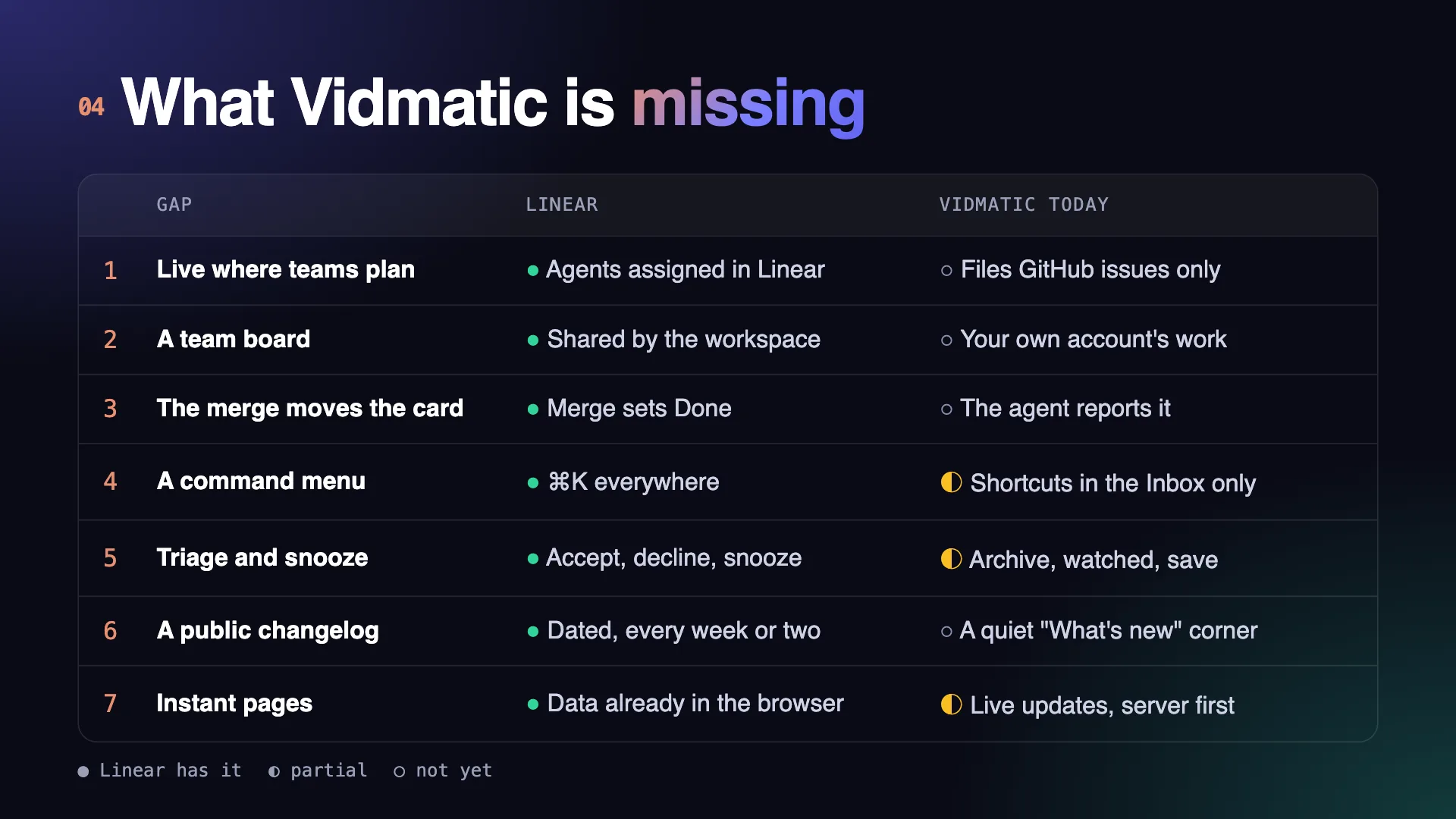 Seven things Linear does that Vidmatic does not do yet, or only does in part.
- We do not live where teams plan. Vidmatic files issues into GitHub only. A team that runs on Linear has to copy the link across by hand. Filing into Linear, and showing up inside Linear as an agent you can assign, is the gap that matters most.
- There is no team board. Agent Workstreams shows your own account's work. Linear's whole bet is that work is shared, "a capability the whole organization shares", in its own words (coding sessions). A lead should see every agent on the team at a glance.
- The merge does not move the card. Your agent tells Vidmatic when it shipped. In Linear nobody has to tell anyone: the merge moves the issue. Our board should trust the merge, too.
- There is no command menu. Our Inbox has real keyboard shortcuts, modelled partly on Linear: j and k to move, e to archive, ? for help. The rest of the app does not, and there is no Cmd+K.
- The Inbox cannot snooze. You can archive a recording, mark it watched or save it, but you cannot say "not now, bring it back Monday", and you cannot accept or decline the way Linear's triage does.
- We ship quietly. We landed more than 450 changes in the last month and you would not know it. There is a small "What's new" corner for signed-in users, and no public, dated changelog. Linear posts one every week or two, and the habit is half of its brand.
- Pages wait for the server. Every Vidmatic page asks the server before it draws. Linear's pages are already in the browser when you open them.
What we are taking from Linear
Linear won by being the place work lives. Vidmatic should be the proof that the work got done, posted wherever that work lives: on the Linear issue, on the GitHub pull request, in the Inbox of the person who asked. A status nobody had to type is a status people trust, so merges and demos should move our cards without anyone reporting in. And the small things, a command menu, snooze, a dated changelog, are not small to the people who use a tool every day. Pages that open before the server answers are a big project, and we are honest that it is further out.
Linear is right that issue tracking as a handoff is dead. What replaces it still needs one person who is accountable, and that person needs to see the work, not read about it. That is the part we build. The seven gaps above are the list we hold ourselves to, and we will post here as each one closes.
See the whole loop on video in Circle it. Say it. See it shipped., or try it on your next bug from pricing.
Frequently asked questions
- Is Vidmatic a Linear alternative?
- No. Linear plans and tracks the work. Vidmatic records what you saw, hands it to your coding agent, shows the work live and brings back a narrated video of the fix. Today Vidmatic files GitHub issues only, so a team on Linear uses both, side by side.
- Does Vidmatic integrate with Linear today?
- Not yet. Vidmatic files issues into GitHub through its GitHub App. Filing into Linear, and showing up inside Linear as an agent you can assign, is the first gap on our list.
- How does Linear let coding agents work on issues?
- You assign or @mention an agent such as Cursor, Codex, Devin or Linear's own agent, the same way you would a person. You stay the main assignee and the agent joins as a contributor. Linear's line for it is: delegate issues, but not accountability.
- Does Linear show proof that an agent's fix works?
- Since August 20, 2026, Linear's coding sessions test the change in a browser and attach before-and-after screenshots to the review. Vidmatic sends a narrated video of the fix, explained against the original ask, to the person who asked.
- Why does Linear say issue tracking is dead?
- Linear's CEO wrote in March 2026 that issue trackers were built for handing work from one person to the next, and that the next system is built around context and agents working with you. Tracking does not go away; it stops being something people do by hand.
- Can my whole team see an agent's progress in Vidmatic?
- Today Agent Workstreams shows your own account's work. Anyone with the link can open a public demo you share, but a team board where a lead sees every agent at once is one of the seven gaps.
Full video transcript
Third time explaining the same button. Your agent says it's done. Things get lost when someone retells what they saw. So stop retelling. Show it. Draw on your app, and just talk it through. Every word and every mark, pinned to the second. Paste one line. Your agent watches it, with your code open. You watch every step, as it happens. Then it films the proof. Before, and after. It ships, and the proof lands in your inbox. Ten minutes. Nothing lost in the handoff. Vidmatic. Video for your coding agent.
Try it on your next bug
Record the problem, hand it to your coding agent, and get a narrated demo of the fix.