Proof of work for AI coding agents: why every PR needs a demo video
Your agent says done with the same confidence whether the fix works or not. Tests prove the code paths you thought of. A video of the running app proves the thing the user will see.
By Vidmatic · · 4 min read
Every developer who has worked with a coding agent knows this exchange. "Done! I've fixed the pricing page." You open the pricing page. It is not fixed. The agent was not lying. It edited the file it thought was right, ran the tests it wrote for that reading of the task, and they passed.
Simon Willison put the standard plainly in Your job is to deliver code you have proven to work. That standard does not get weaker when an agent writes the code. It gets more important, because the agent's confidence carries no information.
A claim is not evidence
"Done" from an agent is a claim. A green CI run is evidence that the code paths someone wrote down still behave. Neither one shows the thing the person who asked will look at: the screen, after the change, doing the right thing.
That gap is where agent work goes wrong in practice. The agent fixed the button on the wrong card. It changed the label but not the color. It fixed the page you named and broke the one next to it. All of these pass their own tests.
The cheapest evidence that closes the gap is a short video of the running app, recorded after the change, walking the same path a user would. A reviewer can watch it in a minute without checking out the branch, and "it does not look like that" becomes obvious before the merge instead of after.
What makes a demo video count as proof
Not every video is evidence. A screen recording someone made by hand, of the happy path, on their own machine, proves less than it looks. For a demo to work as proof of work for AI coding agents it needs four things:
- It is recorded from the running app, not from a design or a mock.
- It follows the real journey: the page and the clicks the original ask was about.
- It is made after the change, from the branch that will merge.
- It is attached to the work it proves: the issue, the pull request, the stage that produced it.
A fifth helps a lot for bug fixes: the same path recorded before the change, so the reviewer sees the difference instead of trusting a description of it. That pairing has its own post: Before and after bug fix video: a reviewer's template.
Make the agent record it
The person who should not have to record the demo is you. Your agent already knows what changed, and it can drive a browser. With the Vidmatic MCP connected, one line asks for it:
/mcp__vidmatic__record <what to show>
The skill learns the feature from the code, designs the journey, drives your running app with Playwright, writes a narration pinned to what is on screen, and publishes it. Vidmatic transcodes and renders the AI voice on its servers, so nothing encodes video on your machine. The demo lands in your Inbox, with a public link you can drop into the pull request. This is what we mean by an AI agent proof-of-work demo.
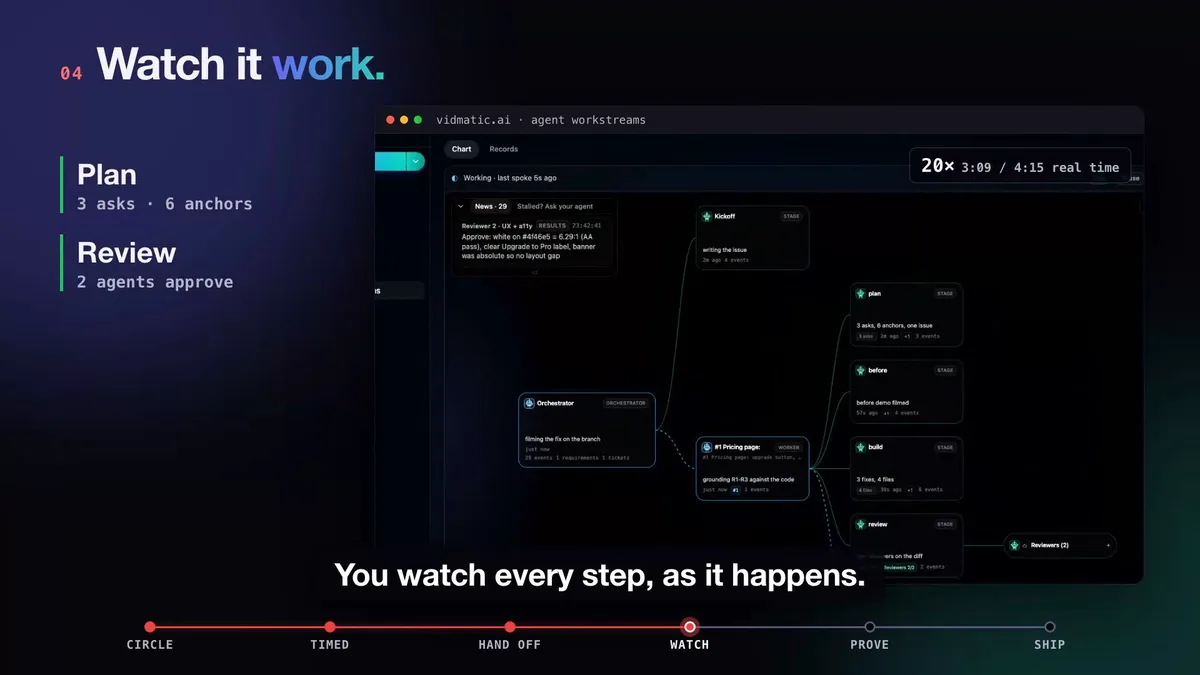 Each stage card appeared when the agent reported it. The demo attaches to the stage that produced it.
When the work runs as a workstream, the proof does not float on its own. Each stage the agent reports, plan, build, review, ship, carries a record of what it did and why, with its files and links, and the demo and the pull request sit on the same card. A reviewer following the card from the pull request can see what was asked, what was decided, and what the result looks like.
For bug fixes: before and after
For a bug, one video of the fixed app is good. Two videos are better: the bug as it is today, and the same path after the fix. The before_after skill records each half in its own run, usually hours apart, connected by the issue URL:
/mcp__vidmatic__before_after before <issue URL>
/mcp__vidmatic__before_after after  <issue URL>
Vidmatic pairs the two halves so one link plays both, in order. Nothing is spliced; the two recordings stay two files.
 Same page, same path, same circle. Red before, green after.
Where it lands
The pull request merges, the agent reports the ship, and the proof is in your Inbox linked back to the issue it answers. Nobody has to remember which video belonged to which change.
 The receipt: merged, every stage ticked, and the before and after one click away.
The full run this post is cut from, from a two-minute bug recording to a merged fix with proof, is in Circle it. Say it. See it shipped.
Make it the default
Proof that is optional gets skipped on the day it matters. Two ways to make it routine:
- Put it in your repo's instructions. If your repository has a CLAUDE.md or AGENTS.md, add a line saying user-facing changes end with a recorded demo. Your agent follows your repo's conventions.
- Start from a recording. When the work starts from a Vidmatic recording, the workstream ends with a demo of the finished work. For a before and after, add a line to the prompt asking for one before the fix starts, and the agent runs the before_after skill.
Connect once with the command on the screen recording MCP server page, sign in in the browser, and ask for the demo on the next pull request your agent opens.
Frequently asked questions
- What is proof of work for an AI coding agent?
- Evidence, produced by the agent, that the change does what was asked in the running app. Green tests are part of it. A short video of the real journey, recorded after the change, is the part a reviewer can check in a minute without pulling the branch.
- Do passing tests not already prove the fix?
- They prove the cases someone wrote down. An agent writes its own tests for its own reading of the task, so a misread task gets passing tests. A video shows the screen the person who asked will actually look at.
- Can the agent fake a demo video?
- The demo is recorded by driving your running app in a headless browser, so it shows what the app really did on that run. The narration is the agent's description of it, which is why the reviewer watches the screen, not just the voice.
- What does an agent need to record a demo?
- Node and a headless browser on its machine, and an app it can reach; a local dev server is fine. Vidmatic transcodes and narrates on its servers, so nothing encodes video on your laptop. An app behind a sign-in needs a signed-in session captured once by a person.
- Where does the demo go?
- To your Inbox first, linked to the work it proves. You decide whether to share it; a public link is there for a pull request, a teammate or a customer.
Full video transcript
Third time explaining the same button. Your agent says it's done. Things get lost when someone retells what they saw. So stop retelling. Show it. Draw on your app, and just talk it through. Every word and every mark, pinned to the second. Paste one line. Your agent watches it, with your code open. You watch every step, as it happens. Then it films the proof. Before, and after. It ships, and the proof lands in your inbox. Ten minutes. Nothing lost in the handoff. Vidmatic. Video for your coding agent.
Try it on your next bug
Record the problem, hand it to your coding agent, and get a narrated demo of the fix.