Get your own drumming agents: monitor your AI coding agents at a glance
Every AI coding agent becomes a little robot. It drums while it works and holds up a sign the moment it needs you.
By Vidmatic · · 2 min read
You hand your coding agents three issues, all from one 20-second screen recording, and go make coffee. When you come back, the terminal has scrolled past anything useful. Still working? Blocked, waiting on you? Stuck for an hour?
See what your coding agent is doing
Vidmatic's Agent Workstreams lets you monitor AI coding agents on one page. Every agent is a robot. Working robots drum, all to the same beat.
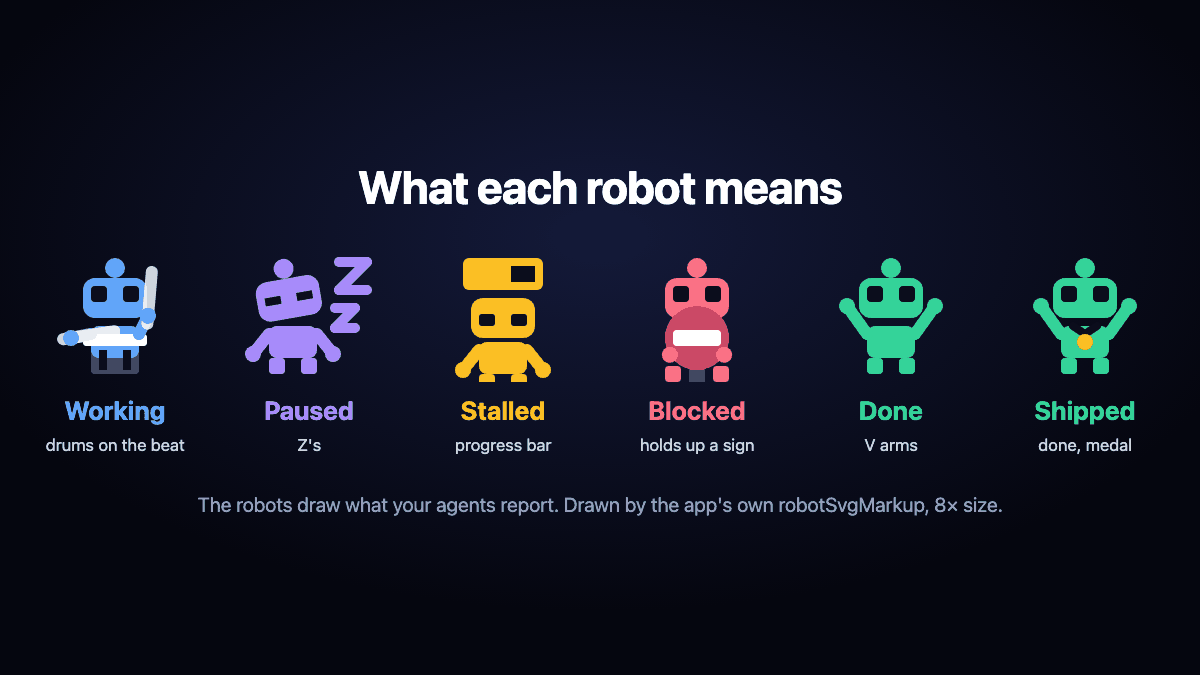 Every pose reads at a glance.
So the one that stops, you spot from across the room. Zzz means resting. Arms up means done.
One holds up a sign
Before your coffee is done, one agent hits a question it shouldn't guess. It puts down its sticks and raises a red sign. The others keep drumming.
 One stuck, three still working.
A red card appears with its question, word for word: Which testimonial: Priya's or Sam's?
 The agent's question, word for word.
You answer in one paste
The card has one button, Ask your agent, and it copies a resume prompt. Paste it into the same terminal and add your answer: Priya.
The agent picks up exactly where it stopped. Nothing restarts. The sign comes down, the sticks come up, right on the beat.
 Blocked becomes Working, no refresh.
Then it ships
The pull request merges. The robots throw their arms up. Your agent records a narrated demo of the finished page, and it lands in your Inbox.
Get your own drumming agents
Your agent reports each step; Vidmatic draws it, and never reads your terminal or your code. Connect Claude Code once:
claude mcp add --transport http vidmatic https://api.vidmatic.ai/mcp
Run /mcp, choose Authenticate, and sign in. Start your next task with /mcp__vidmatic__workstream, open Agent Workstreams, and go make coffee. The band keeps the beat.
Frequently asked questions
- How can I tell if my AI coding agent is still working?
- Open Agent Workstreams in Vidmatic. A drumming robot means the agent is working; a red sign means it is blocked waiting for your input.
- Does Vidmatic watch my terminal?
- No. It draws only what your agent reports through the Vidmatic MCP, and never reads your terminal or your code.
- Can I monitor several coding agents at once?
- Yes. Every agent, sub-agent and stage gets its own robot, and they all drum to one beat.
- Does answering restart the work?
- No. Your paste picks up the same work where it stopped, and nothing runs twice.
- Is there a free plan?
- Yes. See the pricing page for what it includes.
Full video transcript
Is your AI agent working, or stuck? Record your screen, and ask for the change. Then get your own drumming agents. They drum to one shared beat while they work. Uh oh. One stops, and holds up a sign. It's blocked. The card shows its exact question. Copy it with Ask your agent, add your answer, paste. Same workstream, nothing restarted. It drums back in. Shipped. Your demo video is in your Inbox. Get your own drumming agents, at vidmatic dot A I.
Try it on your next bug
Record the problem, hand it to your coding agent, and get a narrated demo of the fix.