Before and after bug fix video: a reviewer's template
A bug fix pull request makes one claim: it was broken, now it is not. Two short videos of the same path prove it faster than any description. Here is the template we use, and how the agent fills it in.
By Vidmatic · · 5 min read
A bug fix pull request makes exactly one claim: this was broken, and now it is not. The usual way to support that claim is a paragraph and maybe a screenshot of the fixed state. The reviewer then has to take the "was broken" part on trust, and check the "now it is not" part by pulling the branch.
Two short videos of the same path do both jobs in under a minute. GitHub has been making this easier too: the GitHub CLI added an --attach flag for media in issues, pull requests and comments in September 2026. What is still missing on most teams is a habit and a template. Here are both.
Why a before and after beats a description
A description of a bug is the author's memory of it. A before and after bug fix video is the bug itself, then the same path working. Three things change for the reviewer:
- They see the bug was real, and that it was the bug the issue described, not a nearby one.
- They see the fix on the path the user takes, not only in the test the author wrote.
- They see what else changed. Layout shifts, a new loading flash, a label that moved. Side effects that no test asserted show up on screen.
This matters more when a coding agent wrote the fix. The agent's description of what it changed is fluent whether or not the change is right. The video is not.
The template
Copy this into your pull request template, or your repo's instructions for your agent:
## Before and after

Issue: <issue URL>
Path: <start page> -> <step> -> <step> -> <where the bug shows>

Before (recorded on <commit or main>, before the fix):
<link>
Shows: <the broken state, in one sentence>

After (recorded on this branch):
<link>
Shows: <the same state, working, in one sentence>

Not covered: <anything the videos do not show, or "nothing">
Five rules make the template work:
- Same path, both halves. Same start page, same steps, same data. If the after video takes a different route, it proves a different thing.
- Before first. Record the bug before you touch the code. Afterwards it only exists on main, and reproducing it there is slow.
- Stop on the state. Pause on the broken state, and on the fixed one, long enough to read it.
- One sentence each. "Shows:" says what to look at. The reviewer should not need the audio to know.
- Say what is not covered. A fix that also touches mobile, or a second page, says so instead of letting the video imply it.
A worked example
This is a real run from our demo app. The ask was three changes on a pricing page: the Pro button said Submit in grey instead of Upgrade to Pro in the brand blue, a leftover beta banner, and a price shown as $240 instead of $24.
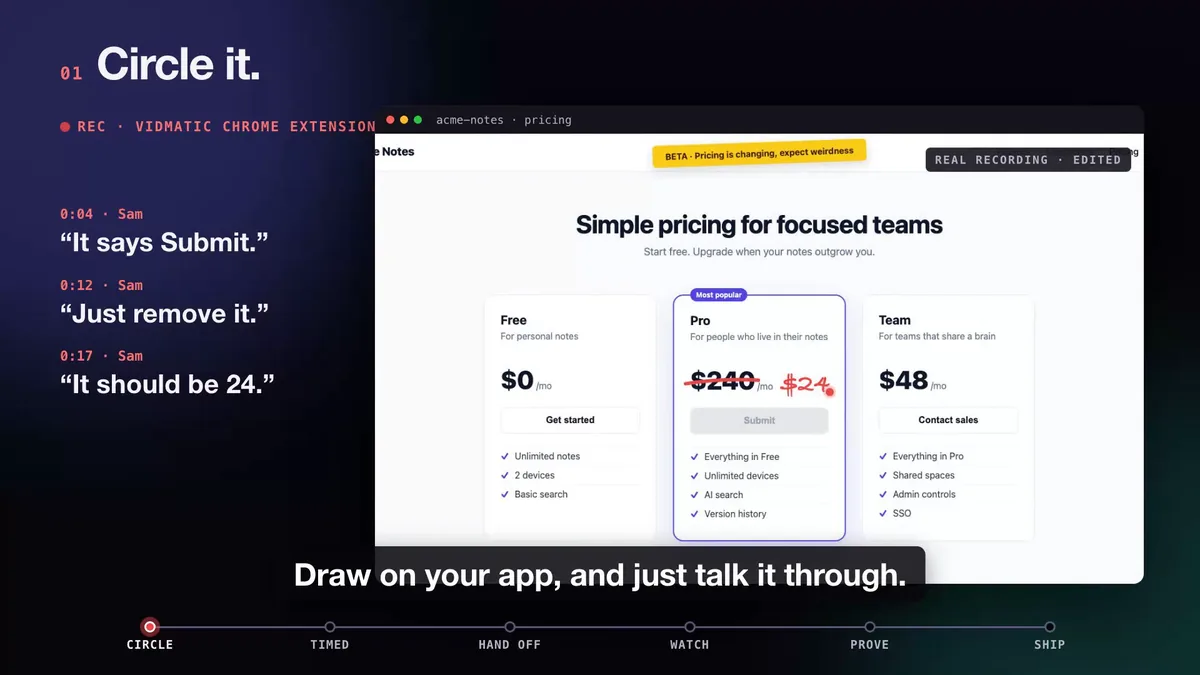 The original recording: three asks, each with its own mark. The before video walks this same page.
The before half opened the pricing page and stopped on the grey Submit button and the $240 price. The after half, recorded from the branch, walked the same page and stopped on the blue Upgrade to Pro button at $24.
 Same page, same path, same circle. Red before, green after.
The whole run, from the bug recording to the merged pull request, is in Circle it. Say it. See it shipped.
Have your coding agent record both halves
Filling the template by hand is still work, and the before half is the one people skip because the fix is already half written. A coding agent does not have that excuse. With the Vidmatic MCP connected, the before_after skill records one half per run, usually from two sessions hours apart, connected only by the issue URL:
/mcp__vidmatic__before_after before <issue URL>
/mcp__vidmatic__before_after after  <issue URL>
Each run drives your running app with Playwright, writes a narration that fits the scene timing, and publishes the half. Vidmatic pairs the two: one link plays the before and then the after, narrated. Nothing is spliced or re-encoded, so a bad half can be re-recorded and swapped in without touching the other.
What it needs, as the skill states it: Node and a headless browser on the agent's machine, an app it can reach (a local dev server is fine), and the before filmed before the fix lands. An app behind a sign-in needs a signed-in session captured once by a person at a machine with a display. Nothing is added to your repository's tracked files (the skill works from a throwaway, gitignored folder) and nothing encodes video on your machine.
When the work started from a Vidmatic recording, the pair also lands in your Inbox and on the workstream, next to the pull request it proves. For why every agent pull request should carry a demo, not just bug fixes, see Proof of work for AI coding agents, and for the product side, the AI agent proof-of-work demo page.
A reviewer's checklist
When a before and after lands on your pull request, check four things before reading the diff:
- Does the before show the bug the issue describes, and nothing milder?
- Is the after the same path, from the same start, with the same data?
- Does the after stop on the state the issue asked for?
- Did anything else on screen change that the description does not mention?
If all four hold, the diff review is about how the fix is written, not whether it works. That is a much faster review.
Frequently asked questions
- What should a before video of a bug show?
- The bug, reproduced live, on the shortest path that reaches it. Start from a screen the reviewer recognizes, take the steps, and stop on the broken state long enough to read it. No fix, no commentary about the fix.
- Why record the before video before fixing the bug?
- Because afterwards it is gone. Once the fix is on the branch the old behavior only exists on main or in production, and reproducing it later is slow and often impossible. Record it first, then fix.
- How long should a before and after video be?
- As short as the path. Most UI bug fixes fit well under a minute a side. If a half runs much longer, the path probably wanders and the reviewer will lose the thread.
- Should the two halves be edited into one video?
- They do not have to be. Vidmatic keeps the two recordings as two files and pairs them, so one link plays the before and then the after, and either half can be replaced later without a re-render.
- Can my coding agent record both halves?
- Yes. With the Vidmatic MCP connected it runs the before_after skill twice, once before the fix and once after, passing the same issue URL both times. Each run drives your app in a headless browser and narrates what it shows.
Full video transcript
Third time explaining the same button. Your agent says it's done. Things get lost when someone retells what they saw. So stop retelling. Show it. Draw on your app, and just talk it through. Every word and every mark, pinned to the second. Paste one line. Your agent watches it, with your code open. You watch every step, as it happens. Then it films the proof. Before, and after. It ships, and the proof lands in your inbox. Ten minutes. Nothing lost in the handoff. Vidmatic. Video for your coding agent.
Try it on your next bug
Record the problem, hand it to your coding agent, and get a narrated demo of the fix.